Windows XP Windows 7 Windows 2003 Windows Vista Windows 綜合教學 Linux 系統教學
Windows 10 Windows 8 Windows 2008 Windows NT Windows Server 電腦軟體教學

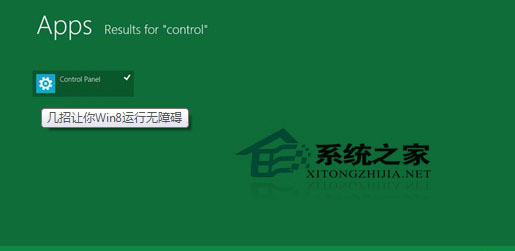
Win8 找回誤刪 Metro 磚片:搜尋 Control Panel 重新釘選

編輯:Win8 系統應用技巧

Windows 8 Modern UI 磚片誤刪後,可透過開始畫面直接輸入 Control 搜尋找到「控制台」圖示,右鍵 → 螢幕右下角「釘選」即可恢復。同理可恢復任何系統內建 Modern App 磚片。

操作步驟

  1. 開始畫面直接輸入 Control (自動啟動搜尋)。
  2. 左側結果出現「控制台」→ 右鍵點選。
  3. 螢幕右下角應用程式列出現「釘選」按鈕 → 點選即恢復磚片。

搜尋 Control Panel 釘選

擴充應用

同樣方法適用於「電腦設定」、「Windows Update」、「裝置管理員」等系統工具磚片的恢復。

心得

Windows 8 早期版本 Explorer 崩潰頻繁、相容性問題多,不建議一般使用者主力機安裝。Metro 介面對鍵鼠操作不友善,觸控裝置體驗較佳。

Copyright © Windows教程網 All Rights Reserved