Windows XP Windows 7 Windows 2003 Windows Vista Windows 綜合教學 Linux 系統教學
Windows 10 Windows 8 Windows 2008 Windows NT Windows Server 電腦軟體教學

限制本機磁碟機存取權限:群組原則隱藏 C 槽防止他人存取

編輯:Win8 系統應用技巧

Windows 專業版/企業版可透過群組原則「防止從『我的電腦』存取磁碟機」隱藏指定磁碟機 (如 C 槽),檔案總管與「執行」指令均無法存取,提升共用電腦安全性。

操作步驟

  1. Win+R → gpedit.msc 開啟群組原則編輯器。
  2. 依序展開:「使用者設定」→「系統管理範本」→「Windows 元件」→「Windows 檔案總管」。
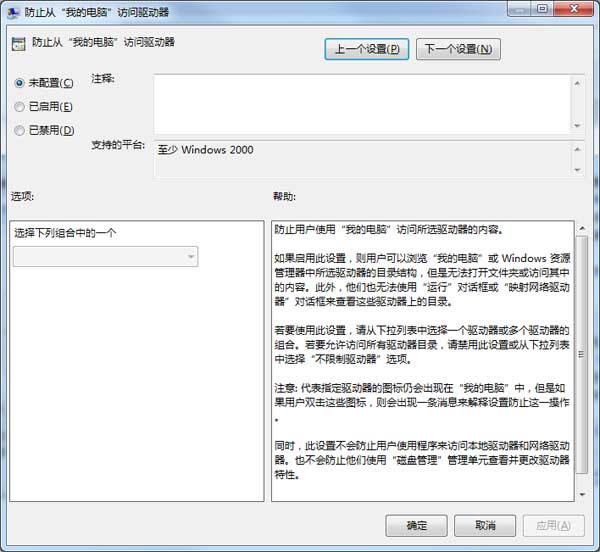
  3. 雙擊「防止從『我的電腦』存取磁碟機」→「已啟用」。
  4. 選項選擇「僅限制 C 槽」→「套用」→「確定」。
  5. Win+R → gpupdate /force 或重新啟動生效。

啟用群組原則

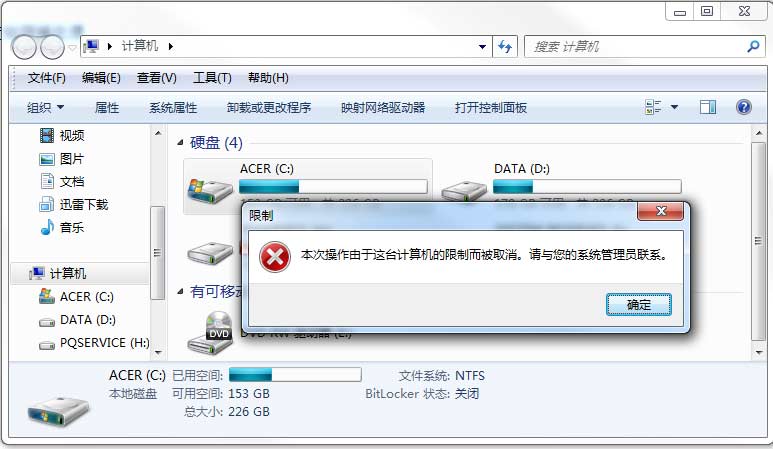
受限提示

效果驗證

  • 檔案總管「這台電腦」不再顯示 C 槽。
  • Win+R 輸入 C: 提示「此作業已被取消,因為有限制...」。
  • 命令提示字元 dir C: 仍可列出內容 (原則僅限制 Shell 命名空間)。

家用版替代方案

登錄 HKEY_CURRENT_USER\Software\Microsoft\Windows\CurrentVersion\Policies\Explorer\NoViewOnDrive 設定 DWORD 值 4 (十進位) 即隱藏 C 槽 (位元遮罩:A=1, B=2, C=4, D=8...)。

Copyright © Windows教程網 All Rights Reserved