Windows 8.1 啟用授權資料儲存於 C:\Windows\System32\spp\store,可手動備份還原,無需第三方工具。
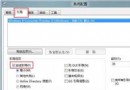
C:\Windows\System32\spp\store 至備份位置 (含隱藏檔案)。slmgr -upk (清除現有金鑰)。msconfig → 「啟動」→ 勾選「安全開機」→ 「最小」→ 重新開機進入安全模式。net stop sppsvc (停用軟體保護服務)。store 資料夾覆蓋 C:\Windows\System32\spp\store。msconfig 取消「安全開機」→ 正常重新開機。slmgr -dli (顯示授權狀態)。| 指令 | 顯示資訊 |
|---|---|
slmgr.vbs -dlv | 最詳細:啟用 ID、安裝 ID、啟用截止日期 |
slmgr.vbs -dli | 摘要:版本、部分金鑰、授權狀態 |
slmgr.vbs -xpr | 是否永久啟用 |
winver | 版本號與建置號 |
手動備份 store 資料夾,重裝系統快速恢復啟用,適合頻繁測試/重灌環境。
安裝 Win8 後卡在「正在啟動 Windows」?BIOS 設定 OS Optimized=Others/Disabled、CSM Support=Yes
Windows 8 啟用高對比度模式:三種快速切換方式助視力需求
Windows 8 解除安裝傳統程式與 Metro 應用差異教學
升級 Windows 8.1 的 8.1 個理由:啟動進桌面、開始按鈕回歸、搜尋強化等
Win8.1 徹底停用家庭群組服務:services.msc 設定教學
Win8.1 錄音機錄音檔儲存路徑:LocalState\Recordings 資料夾快速找到
Windows 8 64 位元安裝 Office 2010 32 位元錯誤 2705 解決:安裝 KB2680376 更新修復字型衝突