Windows XP Windows 7 Windows 2003 Windows Vista Windows 綜合教學 Linux 系統教學
Windows 10 Windows 8 Windows 2008 Windows NT Windows Server 電腦軟體教學

Win8 磁碟機代號重新命名:登錄表 DriveIcons 法

編輯:Win8 系統應用技巧

Windows 8 磁碟機代號若無法透過滑鼠右鍵「重新命名」修改 (常見於從 XP 升級、使用 FDISK 分區的情況),可透過登錄表 DriveIcons 強制指定顯示名稱。

操作步驟 (以 C 槽命名為 Windows8 為例)

  1. Win+R → regedit。
  2. 定位/建立路徑:
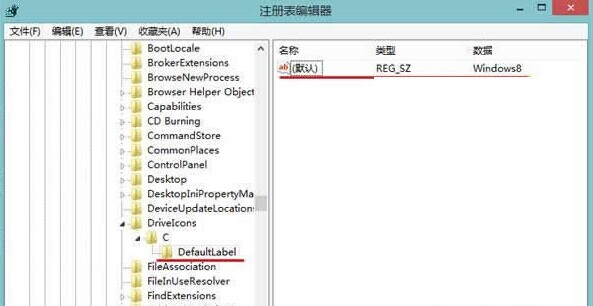
    HKEY_LOCAL_MACHINE\SOFTWARE\Microsoft\Windows\CurrentVersion\Explorer\DriveIcons
  3. 在 DriveIcons 下新增字串值 (項) C。
  4. 在 C 下新增字串值 DefaultLabel。
  5. 修改 DefaultLabel 的數值資料為 Windows8。
  6. 重新開機或重新啟動 explorer.exe 生效。

登錄表 DriveIcons 結構

說明

此法僅改變檔案總管顯示的標籤名稱,不影響實際磁碟機代號與資料。適用於磁碟機標籤混亂、無法正常重新命名的情況。

Copyright © Windows教程網 All Rights Reserved