Windows XP Windows 7 Windows 2003 Windows Vista Windows 綜合教學 Linux 系統教學
Windows 10 Windows 8 Windows 2008 Windows NT Windows Server 電腦軟體教學

Win8 應用程式商店 0x80240437 錯誤修復:重設 Windows Update 元件

編輯:Win8 系統應用技巧

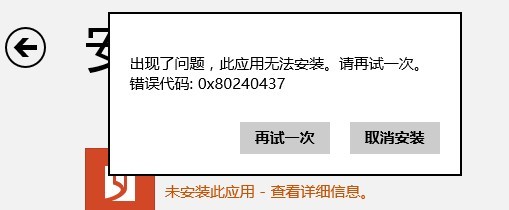
Windows 8 應用程式商店下載/更新應用程式時出現錯誤代碼 0x80240437,主因是 Windows Update 元件異常。重設相關服務與資料夾即可解決。

修復步驟

  1. 按 Win+R 輸入 services.msc 開啟服務。
  2. 找到 Windows Update 服務 → 右鍵「停止」。
  3. 開啟檔案總管,前往 C:\Windows\SoftwareDistribution,將資料夾重新命名為 SoftwareDistributionOld。
  4. 回到服務視窗,右鍵 Windows Update 服務 → 「啟動」。
  5. 再次嘗試開啟應用程式商店或執行 Windows Update,錯誤應已消失。

應用程式商店錯誤畫面

原理說明

SoftwareDistribution 資料夾存放 Windows Update 下載的暫存檔,損毀或鎖定會導致商店無法運作。重命名資料夾強制系統重建乾淨的更新暫存目錄,並重新啟動服務即可修復。

Copyright © Windows教程網 All Rights Reserved