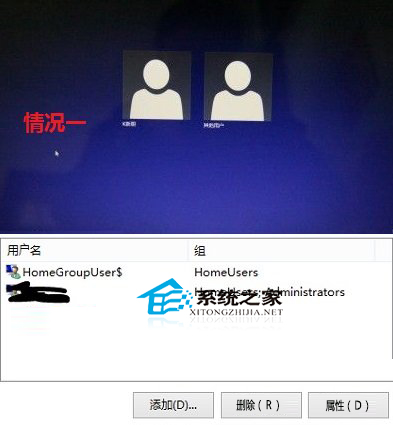
HomeGroupUser$ 為建立或加入家庭群組時自動建立的系統帳戶,用於實現家庭群組共享功能,非實體使用者帳戶,平時可忽略。
HomeGroupUser$
若開機畫面出現多餘帳戶,可在「電腦管理」→「本機使用者和群組」中刪除,或設定自動登入(參考《Win8 免輸密碼自動登入桌面的方法》)。
Win8 應用商店舉報違規應用與評論:四步驟維護生態環境
Windows 8 關閉螢幕大小寫鎖定/數字鎖定提示圖示:ThinkPad/Lenovo 筆電專屬設定
Windows 8.1 藍牙功能開啟完整教學(筆電適用)
Win8 多顯示器進階功能:副螢幕獨立任務列、模式切換、個性化牆紙
Windows 8.1 關機方法大全:Win+X 終於支援關機、15 種關機技巧完整回顧
Windows 8 內建虛擬光碟機使用教學:ISO 掛載與卸載全攻略
Windows 8 調整擴充桌面模式下外接螢幕畫面位置:拖曳圖示即時設定
Windows 8 電源計畫常見問題完整解答:方案建立、刪除、快速啟動、關機選項