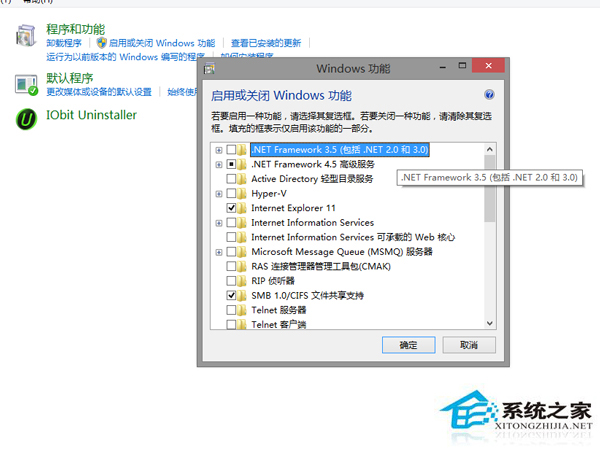
Windows 8 內建小遊戲 (纖紋移動、空當接龍等) 屬於 Windows 選用功能,無法像一般程式透過「程式和功能」解除安裝,需在「開啟或關閉 Windows 功能」中停用。
補充:若升級後發現原本的小遊戲消失,同樣在這裡勾選「遊戲」即可恢復安裝。
Win8 笔记本 Fn 键总被误触?进 BIOS 禁用热键模式彻底屏蔽
Windows 8 進入安全模式三大技巧圖解
Windows 8 將 .xml 檔案關聯還原為「未知應用程式」:登錄編輯器精準移除關聯
Windows 8 命令提示字元輸出複製技巧:標記模式與右鍵複製
Win8 安裝網路印表機完整圖解:手動建立 Local Port 連線共享印表機
Win8 修改螢幕解析度教學:Charms→設定→電腦設定→電腦與裝置→顯示→拖曳調整解析度
Windows 8.1 解除安裝後控制台殘留項目清除教學(登錄法)
Win 8.1 觸控板響應速度調整教學:透過登錄檔優化靈敏度