Windows 8 關機入口隱藏較深,可透過匯入登錄檔在桌面右鍵選單新增「電源選單」,一鍵執行所有電源操作。
Windows Registry Editor Version 5.00

[HKEY_CLASSES_ROOT\DesktopBackground\Shell\Power Menu]
"MUIVerb"="Power Menu"
"SubCommands"="lock;logoff;switch;sleep;hibernate;restart;shutdown"
"Icon"="shell32.dll,215"
"Position"="bottom"

[HKEY_LOCAL_MACHINE\SOFTWARE\Microsoft\Windows\CurrentVersion\Explorer\CommandStore\shell\lock]
@="Lock"
[HKEY_LOCAL_MACHINE\SOFTWARE\Microsoft\Windows\CurrentVersion\Explorer\CommandStore\shell\lock\command]
@="Rundll32 User32.dll,LockWorkStation"

[HKEY_LOCAL_MACHINE\SOFTWARE\Microsoft\Windows\CurrentVersion\Explorer\CommandStore\shell\logoff]
@="Log Off"
[HKEY_LOCAL_MACHINE\SOFTWARE\Microsoft\Windows\CurrentVersion\Explorer\CommandStore\shell\logoff\command]
@="Shutdown -l"

[HKEY_LOCAL_MACHINE\SOFTWARE\Microsoft\Windows\CurrentVersion\Explorer\CommandStore\shell\switch]
@="Switch User"
[HKEY_LOCAL_MACHINE\SOFTWARE\Microsoft\Windows\CurrentVersion\Explorer\CommandStore\shell\switch\command]
@="tsdiscon.exe"

[HKEY_LOCAL_MACHINE\SOFTWARE\Microsoft\Windows\CurrentVersion\Explorer\CommandStore\shell\sleep]
@="Sleep"
[HKEY_LOCAL_MACHINE\SOFTWARE\Microsoft\Windows\CurrentVersion\Explorer\CommandStore\shell\sleep\command]
@="rundll32.exe powrprof.dll,SetSuspendState Sleep"

[HKEY_LOCAL_MACHINE\SOFTWARE\Microsoft\Windows\CurrentVersion\Explorer\CommandStore\shell\hibernate]
@="Hibernate"
[HKEY_LOCAL_MACHINE\SOFTWARE\Microsoft\Windows\CurrentVersion\Explorer\CommandStore\shell\hibernate\command]
@="Shutdown -h"

[HKEY_LOCAL_MACHINE\SOFTWARE\Microsoft\Windows\CurrentVersion\Explorer\CommandStore\shell\restart]
@="Restart"
[HKEY_LOCAL_MACHINE\SOFTWARE\Microsoft\Windows\CurrentVersion\Explorer\CommandStore\shell\restart\command]
@="Shutdown -r -f -t 00"

[HKEY_LOCAL_MACHINE\SOFTWARE\Microsoft\Windows\CurrentVersion\Explorer\CommandStore\shell\shutdown]
@="Shut Down"
[HKEY_LOCAL_MACHINE\SOFTWARE\Microsoft\Windows\CurrentVersion\Explorer\CommandStore\shell\shutdown\command]
@="Shutdown -s -f -t 00"
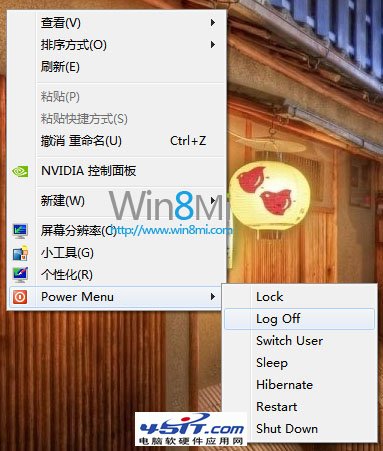
匯入後,桌面空白處右鍵即可看到「Power Menu」子選單,包含鎖定、登出、切換使用者、睡眠、休眠、重新開機、關機,極大方便操作。亦可下載現成 .reg 檔 (含解除安裝項)。