IE11 的 User-Agent (UA) 字串移除「MSIE」關鍵字並加入「Gecko」,導致許多網站誤判為 Firefox,造成版面錯亂或功能異常。UA 字串範例:
Mozilla/5.0 (Windows NT 6.3; WOW64; Trident/7.0; rv:11.0) like Gecko
example.com) →「加入」。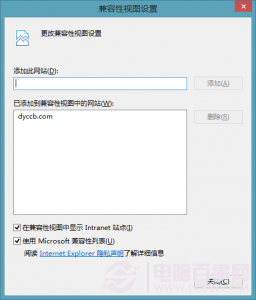
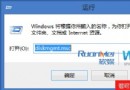
gpedit.msc 開啟群組原則編輯器。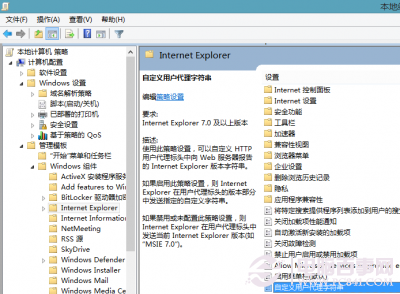
電腦設定 → 系統管理範本 → Windows 元件 → Internet Explorer → 使用者代理程式字串自訂。MSIE 8.0 (或 MSIE 10.0)。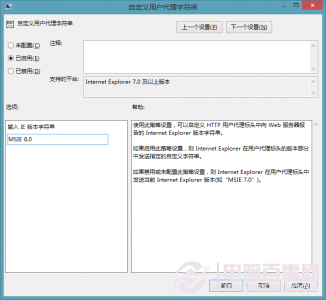
方法二需 Windows 8.1 專業版/企業版 (家用版無 gpedit.msc),修改 UA 可能影響部分現代網站的功能偵測,建議優先使用方法一針對個別網站處理。
Windows 8 開機僅需 10 秒:三大關鍵技術解析(混合啟動、啟動順序優化、RAM 快取)
Windows 8.1 / 8.1 Update 微軟拼音輸入法設定完整指南
Win 8/RT 檔案總管完整介面解析:10 大區塊功能與操作指南
Windows 8 授權全攻略:OEM、VL、ESD、GGS 四大管道正確選購指南
Windows 8 建立圖片密碼登入:觸控/滑鼠手勢解鎖,比傳統密碼更安全
Win8 開始畫面「桌面」磚塊消失怎麼辦?從「所有應用程式」重新固定,或複製 Desktop.lnk 至系統開始選單資料夾
Windows 8 快速上手 15 大實用技巧:關機、關閉應用程式、多工、搜尋、Charms 列、工作列、輸入法、IE 模式切換、分組、Ribbon 介面