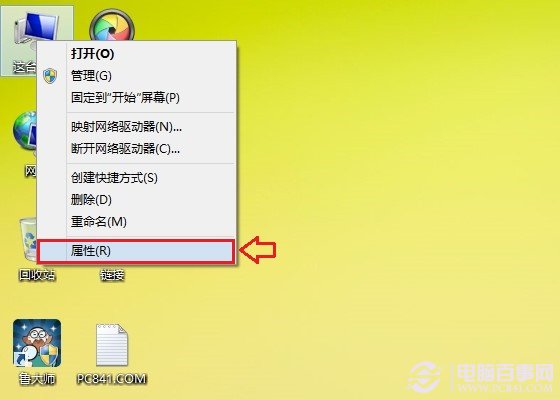
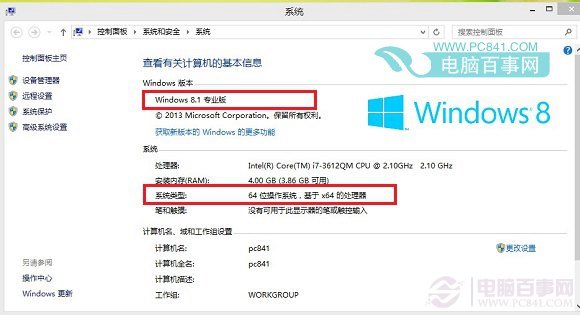
想知道目前是 Win8.1 專業版還是核心版?32 位元還是 64 位元?一鍵查看。
範例圖為 Win8.1 專業版 64 位元。另可參考「Win8.1 哪個版本好」比較差異。
Win10/Win8.1 開始按鈕右鍵無反應?註冊表修復教學
Win8 開始畫面磚塊重新排列、分組、命名與動態更新設定
Windows 8 開發者預覽版常見六大問題解決方案彙整
Windows 8.1 藍牙功能無法開啟?檢查裝置管理員與 BIOS 設定
Windows 8 在 Legacy BIOS 與 UEFI 模式下安裝完整指南
Hyper-V 實戰教學(二):從 ISO 安裝 Windows 7/8.1、動態記憶體與安全開機深度配置
多重開機環境下將 Windows 8.1 設為預設作業系統
Windows 8 預覽版 16 大實用技巧(第三組):關機、搜尋、磚塊、輸入法、任務切換、IE啟動、免密碼登入