透過電話啟動 Windows 或 Office 時,全英文語音提示常讓使用者手足無措。本文整理完整的英漢對照語音流程,涵蓋從歡迎詞、輸入安裝 ID 群組、確認 ID 讀回,到啟動成功/失敗的各種情境,助你輕鬆完成電話啟動。
主要語音流程對照
- 歡迎詞: "Welcome to Microsoft Product Activation." → 歡迎來到微軟產品啟動中心
- 使用者類型: "Press 1 as a home user, 2 for business volume license." → 家庭用戶按 1,企業批量授權按 2
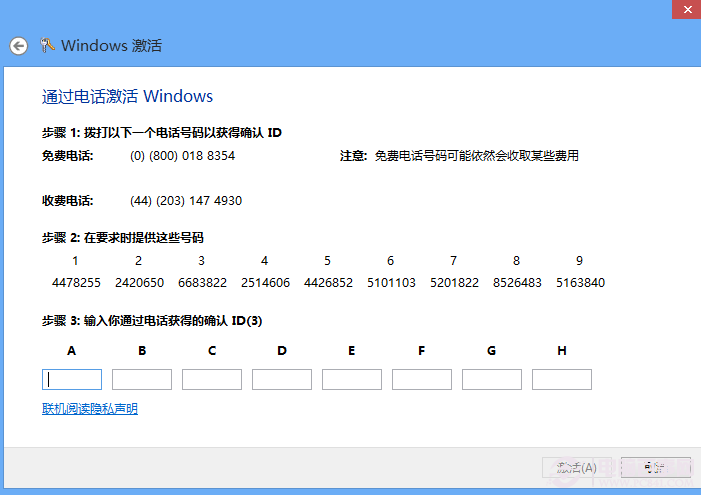
- 準備工作: 需備妥啟動精靈顯示的安裝號碼(安裝 ID)
- 跳過說明: "Press # to skip instructions." → 熟悉流程可按 # 跳過
- 輸入安裝 ID: 系統依序提示 "Please enter the first/second... group" → 請輸入第 1~8 組號碼,每組輸入後語音會回應 "Thank you!"
- 產生確認 ID: "Please wait while your confirmation number is generated." → 請稍候,確認碼產生中
啟動失敗常見提示
- "We are unable to activate your product." → 無法啟動您的產品
- "It is possible that you are a victim of software piracy." → 您可能是盜版軟體受害者
- "No entry was detected." → 未偵測到輸入
啟動成功後續流程
- 詢問安裝台數:"On how many computers is your product currently installed?" → 安裝在幾台電腦?單機請按 1
- 系統朗讀確認 ID(A~H 共 8 組),每組唸完提示 "To continue press #, to repeat press *"
- 完成指示:"To complete, click Next at the bottom of your activation window, then click Finish." → 點擊啟動視窗底部的「下一步」再點「完成」
- 結束語:"Thank you for calling Microsoft. Goodbye." → 感謝致電微軟,再見
建議將本文收藏或列印備用,電話啟動時即可從容應對每一步語音指令。