一、新增中文輸入法
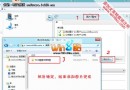
- 點擊桌面右下角「簡體」→ 選擇綠色小字「Change language preferences」。
- 介面中選「Add a language」。
- 彈出視窗選「Chinese (Simplified)」→ Add to list。
- 用「Move up」將新增的中文簡體移至第一位,舊的 US 中文簡體可刪除。
- 若仍打出英文,按 Shift 切換中文再試。
此法亦適用新增其他語言。
二、設定語言列
- 同樣進入「Change language preferences」。
- 選左側「Advanced settings」。
- 勾選「Use the desktop language bar when it's available」。
- 點「Options」→ 選「Docked in the taskbar」(或「Floating on desktop」)。
切換熱鍵
- 語言間切換:Shift+Alt 或 Win+Space。
- 同語言不同輸入法切換:Shift+Ctrl。
微軟內建拼音極強大,秒殺其他輸入法。搜狗、QQ 拼音在 Win 8 亦可用。