Windows XP Windows 7 Windows 2003 Windows Vista Windows 綜合教學 Linux 系統教學
Windows 10 Windows 8 Windows 2008 Windows NT Windows Server 電腦軟體教學

Windows 8 升級 Windows 8.1 預覽版:資料保留完整指南

編輯:Win8 系統基礎知識

微軟在 2013 年 Build 大會上正式啟動 Windows 8.1 預覽版的公測計畫。每當 Windows 系統迎來大版本升級,用戶最關心的莫過於個人檔案、已安裝應用程式以及系統設定能否順利遷移。針對 Windows 8.1 時代的升級路徑,微軟給出的官方說明如下:

不同升級路徑的資料保留情況

  • Windows 8 → Windows 8.1 預覽版:可保留「Windows 設定、個人檔案和大多數應用程式」。
  • Windows 8 → Windows 8.1 正式版:同樣可保留「Windows 設定、個人檔案和大多數應用程式」。
  • Windows 8.1 預覽版 → Windows 8.1 正式版:僅能保留「個人檔案、帳戶資訊」等用戶資料,所有應用程式均需重新安裝。

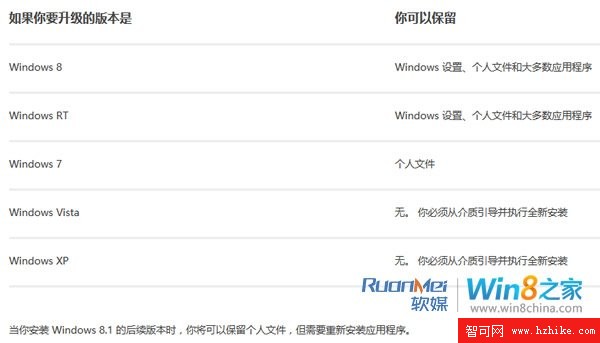
微軟官方另附圖表詳細說明各版本升級時的資料保留差異,建議升級前務必參閱:

Windows 8.1 升級資料保留對照表

特別提醒:當您安裝 Windows 8.1 後續版本(如正式版)時,雖可保留個人檔案,但必須重新安裝所有應用程式。請提前備份重要軟體安裝檔或記錄授權資訊。

Copyright © Windows教程網 All Rights Reserved