Windows 8 移除開機 F8 選單,進入安全模式需透過系統設定工具 msconfig。本文說明如何啟用、停用安全模式,並可在正常模式與安全模式間自由切換。
msconfig → Enter。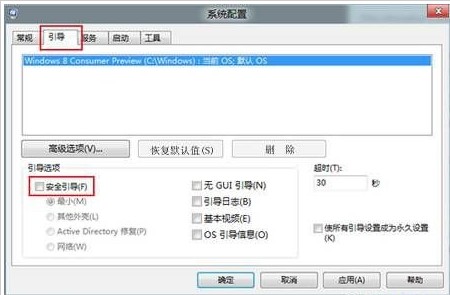
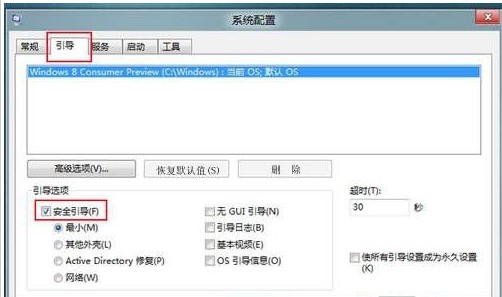
msconfig → 取消勾選「安全開機」→ 重開機回正常模式。補充:「安全開機」下拉選單另有「網路」、「替代 Shell」等選項,依除錯需求選擇。此法適用於 Win8/8.1/10 通用。
Windows 8 開始按鈕消失?Win+X 快速鍵呼叫系統功能選單代替
Windows 8 開始畫面磚塊列數自訂:登錄修改 Layout_MaximumRowCount 突破解析度限制
Windows 8 應用程式相容性問題 10 大解決方案:虛擬機、關閉 UAC、.NET 3.5、補丁更新、驅動程式更新、疑難排解、相容模式、管理員權限、兼容性中心
華碩筆電 Win 8 還原出廠系統 官網下載 ASUS Recovery 執行
Windows 8 版 QQ 卡死?騰訊官方解決方案:避免中文使用者名稱
Windows 8 利用登錄為滑鼠右鍵選單新增功能:QQ、截圖、記事本、滑動關機