Windows 8.1 執行舊版軟體/遊戲出現閃退、報錯、無法啟動,多為相容性問題。依序嘗試:更新軟體版本 → 設定相容模式 → 關閉第三方防毒/輸入法 → 更新顯卡驅動 → 重裝軟體,可解決多數情況。
排查步驟
- 更新軟體:官網下載最新版安裝覆蓋,或解除安裝重裝最新版。
- 相容模式:執行檔右鍵 → 內容 → 相容性 → 勾選 以相容模式執行這個程式 → 選 Windows 7 / Windows XP (Service Pack 3) → 勾選 以系統管理員身分執行。
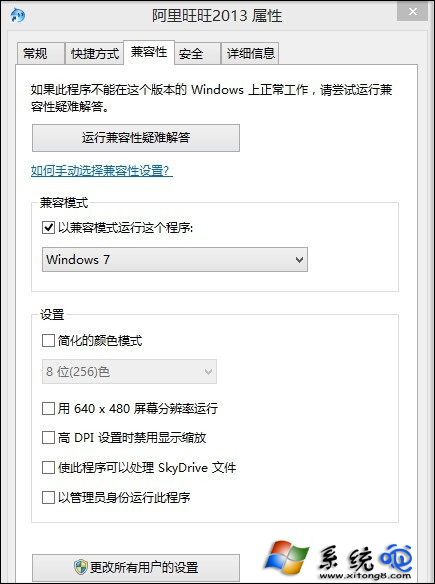
- 關閉干擾軟體:暫時關閉/解除安裝第三方防毒、防火牆、輸入法 (如搜狗、百度輸入法),僅保留 Microsoft 輸入法測試。
- 更新顯卡驅動:NVIDIA/AMD/Intel 官網下載最新 WHQL 版本安裝。
- 重裝軟體:完整解除安裝 (建議用 Geek Uninstaller) 後重新安裝。
遊戲專屬建議
- Steam 遊戲:右鍵遊戲 → 內容 → 本地檔案 → 驗證遊戲檔案完整性。
- DirectX 舊遊戲:下載「DirectX 修復工具」一鍵修復缺失 DLL。
- 16-bit 極舊程式:64 位元 Windows 無法執行,需用 DOSBox、虛擬機 (WinXP Mode) 或 32 位元系統。