Windows XP Windows 7 Windows 2003 Windows Vista Windows 綜合教學 Linux 系統教學
Windows 10 Windows 8 Windows 2008 Windows NT Windows Server 電腦軟體教學

Win8 全螢幕截圖自動存桌面:修改登錄 ScreenshotIndex 歸零

編輯:Windows 8 系統介紹

Win8 Win + PrtSc 全螢幕截圖預設存入「圖片\螢幕擷取畫面」資料夾,找檔案不便。修改登錄 HKEY_CURRENT_USER\Software\Microsoft\Windows\CurrentVersion\Explorer\ScreenshotIndex 數值為 1,下次截圖即會直接存放在桌面並命名為 螢幕擷取畫面 (1).png,方便即時取用。

修改步驟

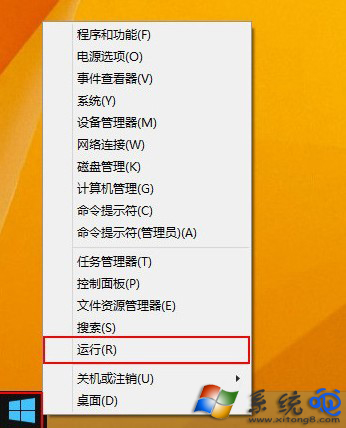
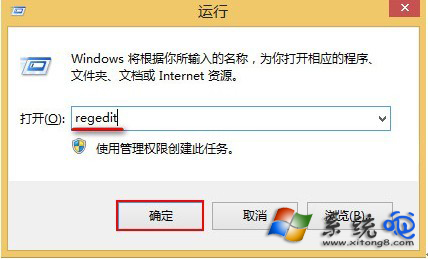
  1. Win + X →「執行」→ 輸入 regedit。
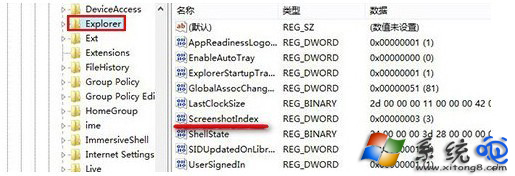
  2. 展開至 HKEY_CURRENT_USER\Software\Microsoft\Windows\CurrentVersion\Explorer。
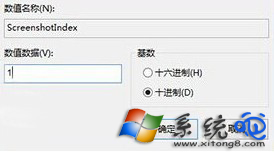
  3. 雙擊 ScreenshotIndex → 數值資料改 1 →「確定」。
  4. 按 Win + PrtSc 測試,桌面即出現截圖檔。

執行 regedit

登錄編輯器

ScreenshotIndex 位置

修改數值為 1

若想恢復預設儲存位置,將數值刪除或改為 0 即可。此技巧同樣適用於 Win8.1/Win10。

Copyright © Windows教程網 All Rights Reserved