Windows XP Windows 7 Windows 2003 Windows Vista Windows 綜合教學 Linux 系統教學
Windows 10 Windows 8 Windows 2008 Windows NT Windows Server 電腦軟體教學

Win8 工作列釘選圖示實際儲存路徑在哪?

編輯:Windows 8 系統介紹

工作列釘選的程式捷徑實際儲存在使用者設定檔下:
C:\Users\<使用者名稱>\AppData\Roaming\Microsoft\Internet Explorer\Quick Launch\User Pinned\TaskBar\
可直接進入此資料夾備份、複製、批次管理捷徑。

路徑說明

  • %AppData% = C:\Users\<帳戶>\AppData\Roaming
  • 完整路徑範例(Administrator 帳戶):
    C:\Users\Administrator\AppData\Roaming\Microsoft\Internet Explorer\Quick Launch\User Pinned\TaskBar\
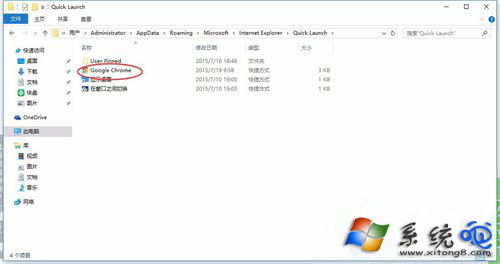
TaskBar資料夾路徑

實用技巧

  • 備份此資料夾可快速遷移工作列配置至新電腦/重灌後。
  • 批次建立捷徑:將目標程式捷徑複製到此資料夾,重新開機或重啟探索器即出現在工作列。
  • 同目錄下 StartMenu 資料夾對應開始畫面釘選項目。
Copyright © Windows教程網 All Rights Reserved