Win8 工作列預設釘選「檔案總管」點擊開啟「程式庫」。修改捷徑目標路徑加入 %windir%\explorer.exe ,(含逗號)即可預設開啟「這台電腦」。
%windir%\explorer.exe。%windir%\explorer.exe , → 「確定」。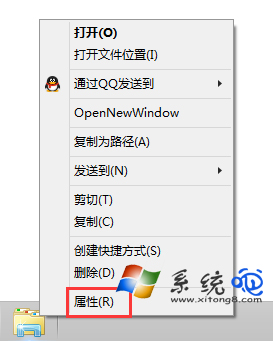
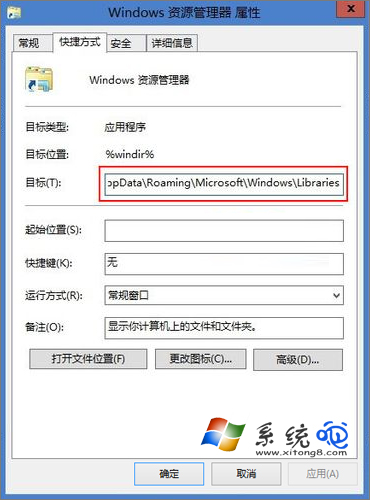
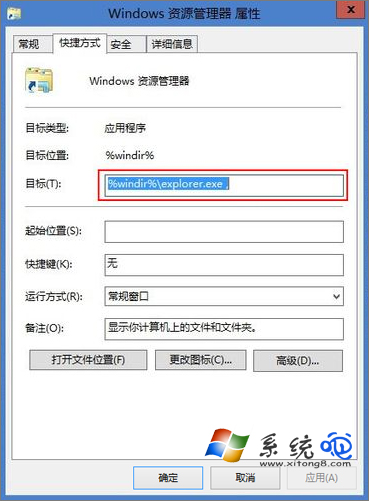
explorer.exe 參數 , (逗號) 代表開啟「這台電腦」視圖;/root,::{20D04FE0-3AEA-1069-A2D8-08002B30309D} 為完整 GUID 寫法,逗號為簡寫別名。同理 explorer.exe /n, /e, C:\ 可指定開啟任意路徑。
Windows 8 瀏覽器相容性抽測:360極速、Firefox、財貓省錢瀏覽器實測報告
Win 8 基礎操作必學:藍牙/Wi-Fi 獨立開關、中文輸入法、Hyper-V 網路、App 設定遷移
Windows 8/8.1 找回隱藏的系統效能評分 (WEI) 工具
Windows 8 快速登出 QQ/社交應用兩大法:AppBar 登出鍵與點擊頭像切換狀態登出
完美解決 Win8.1 IE11 相容性問題:User-Agent 字串缺少 MSIE 導致被誤判為 Firefox,修改登錄恢復 MSIE 標識
微軟 Windows 8 八大新功能預測:雲端運算、可攜工作區、Hybrid Boot、應用商店、IE10、內建 PDF、History Vault、整合 Skype