想一鍵休眠不想按電源鍵?建立捷徑:
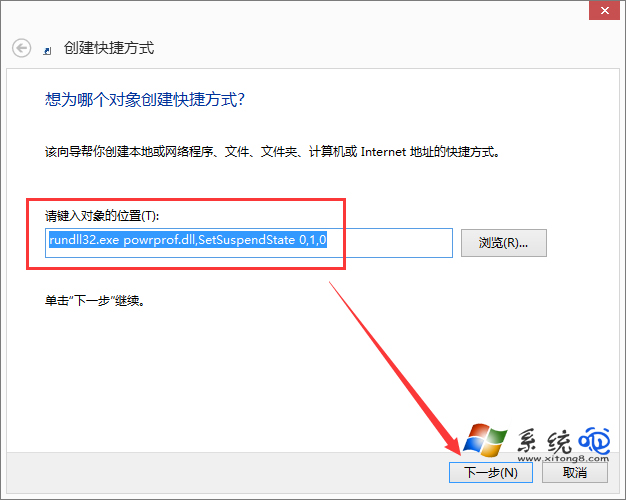
rundll32.exe powrprof.dll,SetSuspendState 0,1,0 → 下一步。
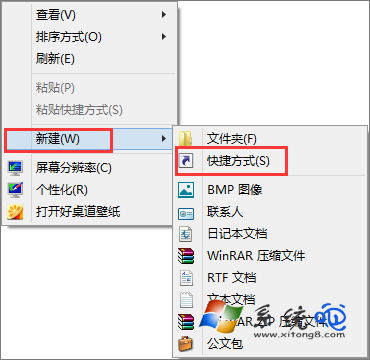
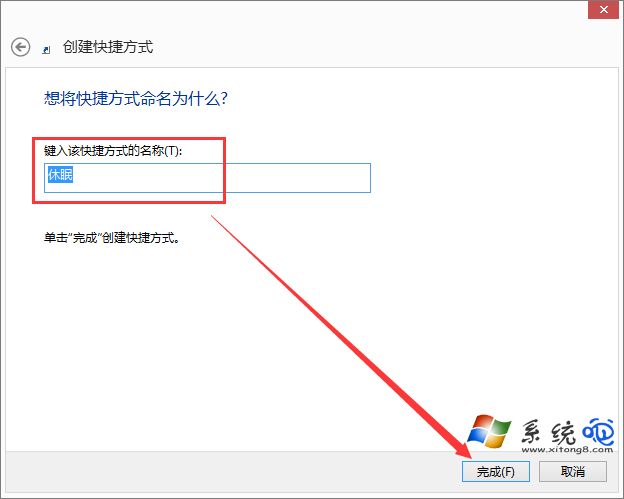

簡單實用,適合頻繁使用休眠的使用者。
Windows 8 IE10 無法開啟?登錄表權限繼承修復法,一鍵解鎖瀏覽器
Win 8 找不到「新增/移除程式」 刪除登錄檔 DisallowCpl 恢復圖示
Windows 8 關機七大法:熱鍵、實體鍵、批次檔、Charms 列全攻略
Win8 應用商店離線無法進入?修改 DNS + 替換 WinStore 資料夾恢復連線
Windows To Go 回歸 Win8 Beta:USB 執行完整企業環境、支援 USB 2.0/3.0、建議 32GB、拔除 60 秒鎖定保護
Win8 玩 CF (穿越火線) 無法全螢幕?顯卡縮放設定調整法