Windows 8 發布後,眾多用戶因網卡驅動不相容、網路設定異常、DHCP/DNS/HOSTS/瀏覽器設定錯誤導致斷網。360 安全衛士升級「斷網急救箱」支援 Windows 8,一鍵全面診斷並自動修復。
常見斷網原因
- 系統內建網卡驅動版本過高不相容。
- 網路連線設定異常。
- DHCP、DNS 服務與 HOSTS 異常。
- 瀏覽器設定異常。
使用方法
- 在 Windows 8 安裝 360 安全衛士 (可透過 USB/行動硬碟離線安裝)。
- 主介面右下角「未成功連接至 360 安全中心」側「診斷網路」→ 自動全面診斷修復。
- 或在「功能大全」中尋找「360 斷網急救箱」執行。
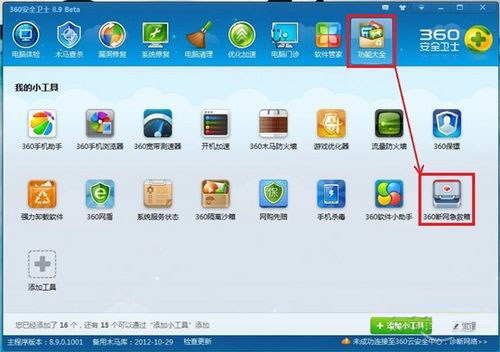
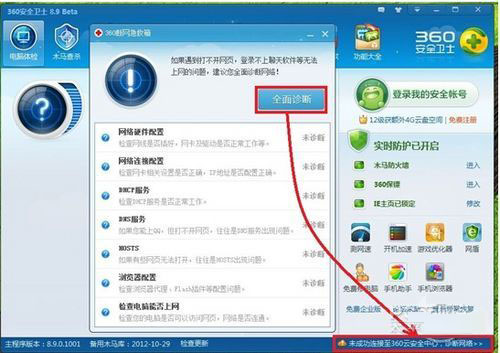
同步推出「網路體檢」功能,更直觀排查網路故障。360 多款安全軟體已進駐 Windows 8 應用商店,用戶超 4 億,深受信賴。