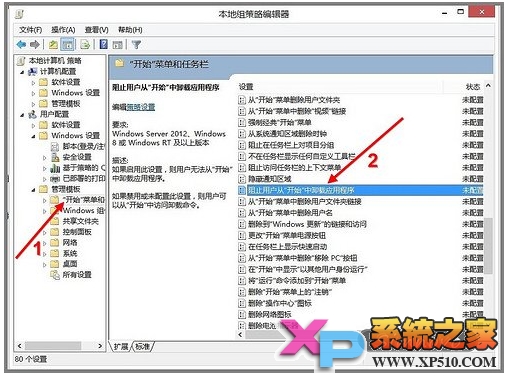
企業或共用電腦環境,可透過群組原則防止使用者誤刪開始畫面的 Metro 應用程式。
gpedit.msc
生效後:使用者在開始畫面右鍵/長按應用程式磚,底列選單將不再顯示「解除安裝」選項。
適用版本:Windows 8 專業版/企業版 (家用版無 gpedit.msc)。
Win8.1 導覽優化:開機直進桌面、開始畫面共用桌布、應用檢視自動顯示等完整設定
Windows 8.1 找回傳統開始選單完整指南:手動建立工具列與 Classic Shell 兩大方案
Win8 清理垃圾檔案:磁碟清理工具內建、免安裝第三方軟體
Windows 8 新增多時區時鐘(顯示不同時區時間)設定教學
Windows 8 開發者預覽版暫不完善支援 USB 2.0/3.0 裝置:官方解釋與暫時對策
Windows 8.1 完整啟用指南:網路啟用與電話啟用雙軌詳解
微軟面向 MSDNAA 提供 Windows 8 開發者預覽版:學生免費體驗
Windows 8.1 虛擬鍵盤完整操作指南:觸控、拇指鍵盤與手寫面板技巧