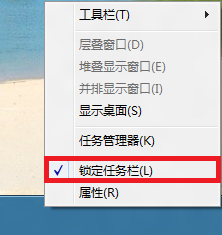
任務列被鎖定時無法拖曳移動位置。解決方法:右鍵點擊任務列空白處 → 取消勾選「鎖定任務列」 (勾號消失) → 即可拖曳任務列至螢幕上下左右任意邊緣。
補充:移動到理想位置後,建議重新勾選「鎖定任務列」防止誤觸移動。Win+T 可循環焦點任務列程式,配合鍵盤操作更高效。
Win8 應用商店打不開、閃退、連不上網?完整修復指南
不習慣 Windows 8?用 Start8 完美找回 Windows 7 經典體驗
Win8 應用商店預設安裝路徑能改嗎?註冊表修改法與權限陷阱全解析
Win8 系統分區該分多大?官方最低 vs 實戰建議對照表
Windows 8 將應用程式、網站、資料夾固定到「開始畫面」完整指南
Windows 8 取消喚醒需輸入密碼,快速進入桌面
Win8 變更 Metro 應用程式預設安裝路徑:修改登錄 PackageRoot 值
Windows 8 雙介面架構:傳統桌面 + Modern 應用,支援滑鼠操作超越 iOS