Windows XP Windows 7 Windows 2003 Windows Vista Windows 綜合教學 Linux 系統教學
Windows 10 Windows 8 Windows 2008 Windows NT Windows Server 電腦軟體教學

Windows 8 升級至 Windows 8.1 預覽版兩大管道完整說明

編輯:Windows 8 系統介紹

Windows 8 使用者可透過 Windows Store 或 ISO 映像檔升級至 8.1 預覽版

管道一:Windows Store 線上升級(適用已安裝 Windows 8 正式版)

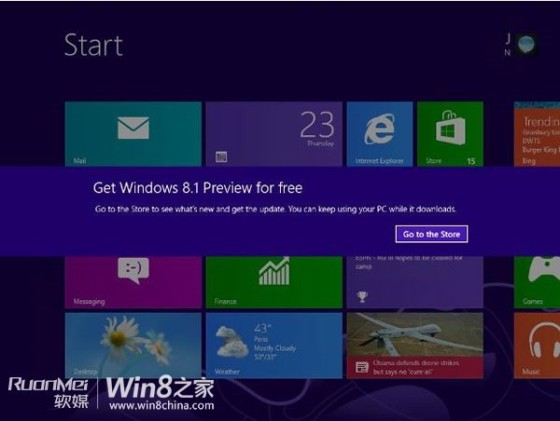
  1. 收到 Windows Update 通知 → 跳轉 Windows Store 的 8.1 預覽版頁面。
  2. 點擊下載安裝,過程類似應用程式更新,中途可取消。
  3. 第一階段完成提示重新開機,倒數計時自動重啟。
  4. 進入 Windows 安裝介面 → 授權條款「接受」。
  5. OOBE 初始設定(個人化、帳戶、設定)與 Windows 8 安裝相同。
  6. 登入 Windows,完成升級。

Windows Store 8.1 預覽版頁面

OOBE 初始設定

管道二:ISO 映像檔離線安裝(適用企業版、非支援語系、乾淨安裝)

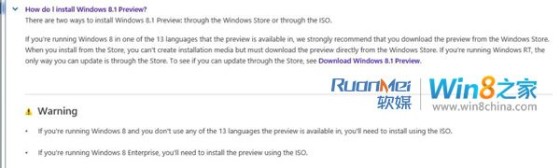
  • Windows 8 企業版使用者必須使用 ISO 升級。
  • 系統語言不在 8.1 預覽版支援的 13 種語言內者需用 ISO。
  • 下載對應版本(x86/x64)ISO,掛載或燒錄安裝。

ISO 映像檔資訊

注意事項

  • 升級前請完整備份重要資料。
  • 預覽版不支援降級回 Windows 8,若需還原須重裝或使用復原媒體。
  • 升級過程中會保留個人檔案與相容應用程式,但部分驅動程式可能需重裝。
Copyright © Windows教程網 All Rights Reserved