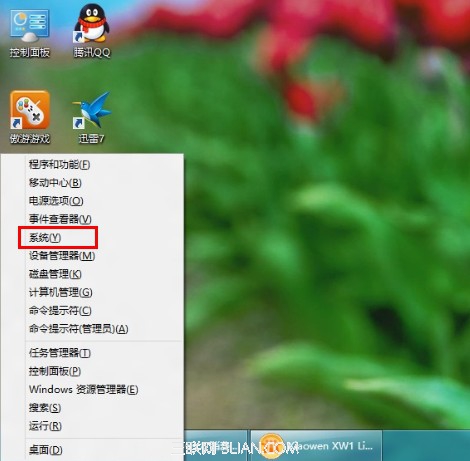
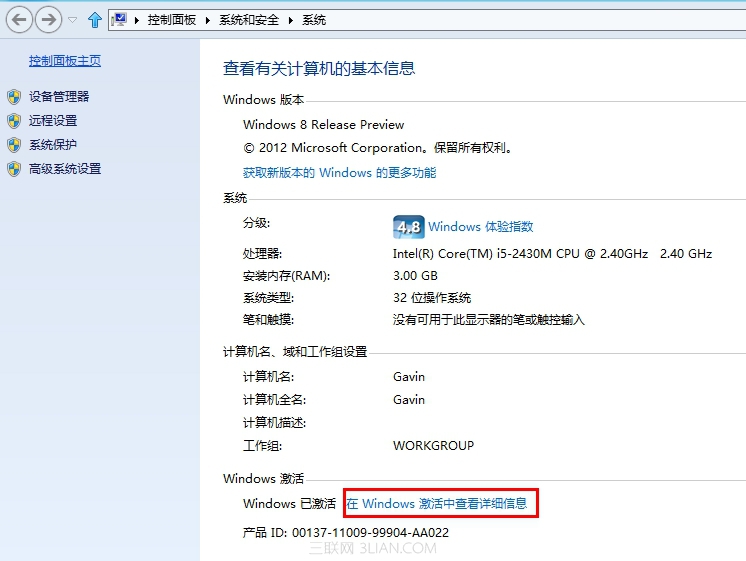
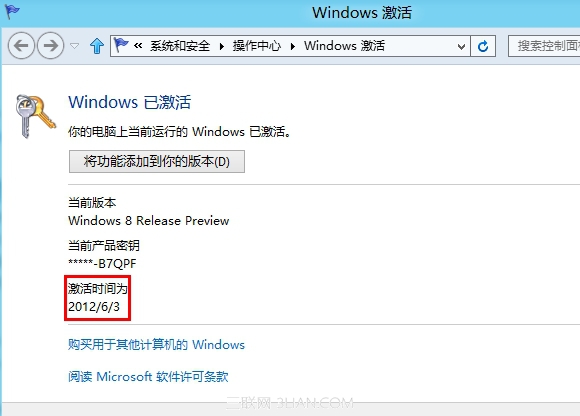
想確認 Windows 是否永久啟用、或是查看啟用時間?Win8/8.1 內建系統屬性頁即可一鍵查看,無需指令。
若顯示「Windows 已啟用」且無到期日,即為永久授權;若為大量授權 (KMS) 可能會顯示剩餘天數。
高手支招:解決 Windows 8 關機後自動重啟
Windows 8 內建磁碟清理工具升級:介面更直觀、清理項目更豐富
Windows 8 安全性能提升详解:Defender 全能化、SmartScreen 双引擎、安全启动、ELAM 早期反恶意,或可免装第三方杀毒
Windows 8 下載其他地區應用程式商店應用:變更地區至美國下載 Skype、預設程式與媒體自動播放設定
Windows 8 設定 PIN 碼登入:四位數字快速解鎖,支援多種登入方式切換
Win8 檔案搜尋進階技巧:固定時段、自訂日期區間、全日/月視圖圖文詳解
Win8 安裝與使用 Bitcoin Miner 挖礦客戶端教學:應用商店免費下載
Windows 8 採雲端授權新機制 徹底改寫反盜版遊戲規則