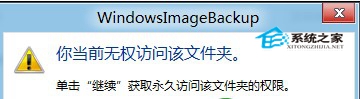
Win8 系統備份產生的 VHD 虛擬硬碟檔,預設儲存於備份磁碟根目錄下 WindowsImageBackup\使用者名稱\Backup 時間戳記 資料夾中。
WindowsImageBackup\使用者名稱\Backup 時間戳記
搭配先前介紹的 VHD 掛載教學,可快速提取備份內特定檔案,無需完整還原系統。
Win8 開始畫面應用分組命名完整操作指南
Win8 將工作列「資源管理器」開啟目錄從「程式庫」改為「這台電腦」
如何判斷遊戲是否相容 Windows 8:官方相容性中心與實測五步驟
Windows 8 內建虛擬光碟機使用教學:ISO 掛載/卸載一鍵完成
Windows 8 SkyDrive Modern 應用完整 FAQ:共享檢視、最近文件、上傳下載、跨應用開啟儲存、搜尋、桌面版必要性、本地帳戶登入
Windows 8 藍牙裝置管理員顯示驚嘆號解決辦法
獨家首發支援 Windows 8:驅動精靈 2011 SP2 版本釋出
升級 Windows 8 前必讀:硬體檢查、快捷鍵與必裝 Metro 應用