Windows XP Windows 7 Windows 2003 Windows Vista Windows 綜合教學 Linux 系統教學
Windows 10 Windows 8 Windows 2008 Windows NT Windows Server 電腦軟體教學

Win8 縮圖顯示異常修復:磁碟清理與快取資料夾手動清除雙重保險

編輯:Windows 8 系統介紹

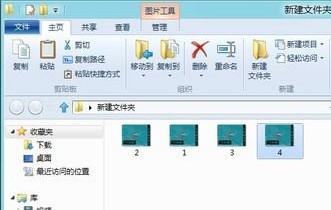
Windows 8 圖片/影片縮圖顯示錯亂,通常為縮圖快取資料庫損毀,兩種修復方法:
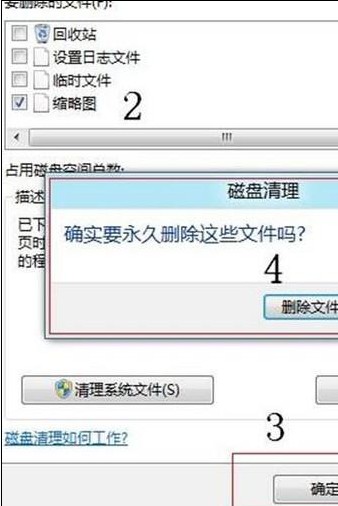
方法一:磁碟清理清除縮圖快取 (圖形介面)

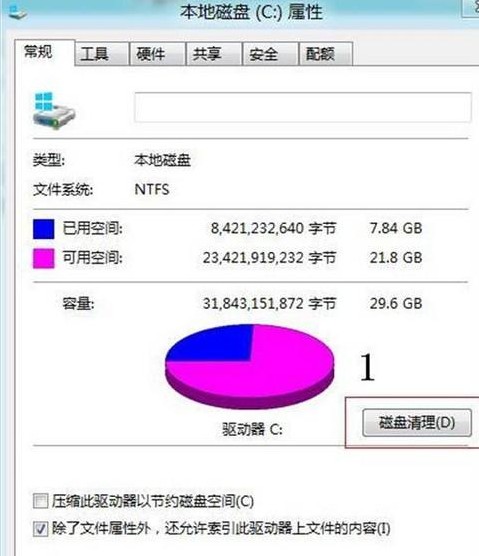
  1. Metro 開始畫面搜尋「磁碟清理」→ 開啟。
  2. 勾選「縮圖」→ 「確定」→ 「刪除檔案」。

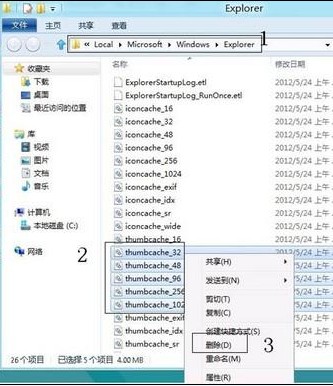
方法二:手動刪除快取資料庫檔案 (徹底)

  1. 檔案總管地址列輸入:%USERPROFILE%\AppData\Local\Microsoft\Windows\Explorer → Enter。
  2. 刪除四個快取檔案:
    • thumbcache_32.db
    • thumbcache_96.db
    • thumbcache_256.db
    • thumbcache_1024.db
  3. 重新開啟資料夾,縮圖自動重建恢復正常。

原理:縮圖快取加速瀏覽,但資料庫損毀會導致錯誤縮圖持續顯示。方法二更徹底,適用方法一無效情況。若頻發生,檢查磁碟健康度 (S.M.A.R.T.) 與檔案系統完整性 (chkdsk)。

Copyright © Windows教程網 All Rights Reserved