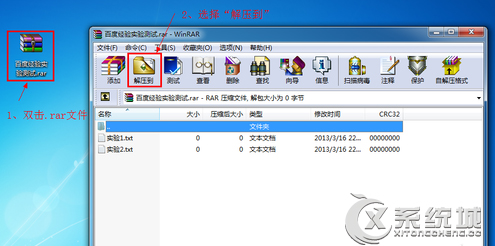
Win 8 開啟 RAR:
安裝任一主流壓縮軟體即可正常開啟 RAR。
Windows 8 管理無線網路設定檔:命令列 netsh wlan 顯示/刪除/查看密碼/停用自動連線完全指南
Win 8.1/RT 8.1 新增語言與鍵盤版面完整圖文教學(七大步驟)
Windows 8/8.1 找回消失的休眠選項完整教學
Windows RT 與 Windows 8 差異大解析:ARM 平台專屬輕量系統
Windows 8 圖片發黃問題:色彩管理移除錯誤 ICC 設定檔、新增 sRGB IEC61966-2.1
Windows 8 電源計畫常見問題解答:唯一預設「平衡」、自訂建立、刪除限制、快速啟動原理
Win8 如何取消開機密碼?控制台使用者帳戶清空密碼教學
Win8 設定預設開啟程式:檔案關聯與控制台兩法全攻略