Windows XP Windows 7 Windows 2003 Windows Vista Windows 綜合教學 Linux 系統教學
Windows 10 Windows 8 Windows 2008 Windows NT Windows Server 電腦軟體教學

Win7 開機卡在 GRUB 救援模式?三行指令進系統 + EasyBCD 重寫 MBR 徹底修復

編輯:Win7 系統基礎知識

誤刪 Linux 分區、更新 Windows 覆寫啟動項、或不明原因導致開機進入 grub> 提示符,無法進入 Windows。GRUB 是 Linux 開機載入器,掌握基本指令可臨時進系統,再用 EasyBCD 重寫 Windows MBR 徹底修復。

臨時進入 Windows(三行指令)

在 grub> 提示符下依序輸入:

find --set-root /bootmgr
chainloader /bootmgr
boot

即可啟動 Windows 開機管理程式進入系統。
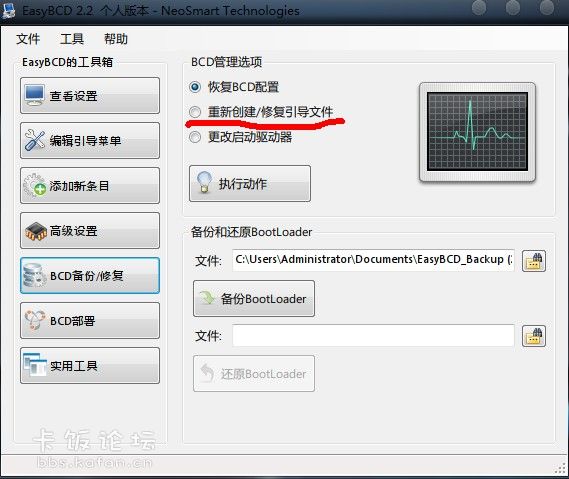
徹底修復:EasyBCD 重寫 MBR

  1. 進入 Windows 後,下載安裝 EasyBCD(免費個人版)。
  2. 開啟 EasyBCD → 「BCD 部署」→ 選「Windows Vista/7/8/10/11 Bootloader」→ 勾選「重寫 MBR」→ 「寫入 MBR」。
  3. 重開機驗證,直接進入 Windows 開機選單,不再出現 GRUB。

GRUB 基本指令補充

  • help:顯示所有指令。
  • reboot:重新開機。
  • halt:關機。
  • ls:列出分區(如 (hd0,1))。
  • set root=(hd0,1):設定根分區。

若無 Windows 環境可用,亦可用 Windows 安裝光碟/USB 進入修復模式 → 命令提示字元執行 bootrec /fixmbr、bootrec /fixboot、bootrec /rebuildbcd 修復。

Copyright © Windows教程網 All Rights Reserved