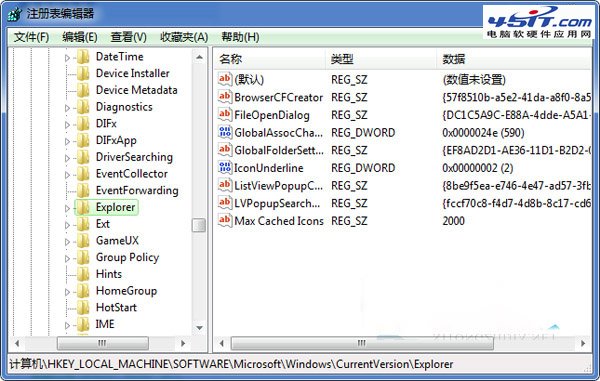
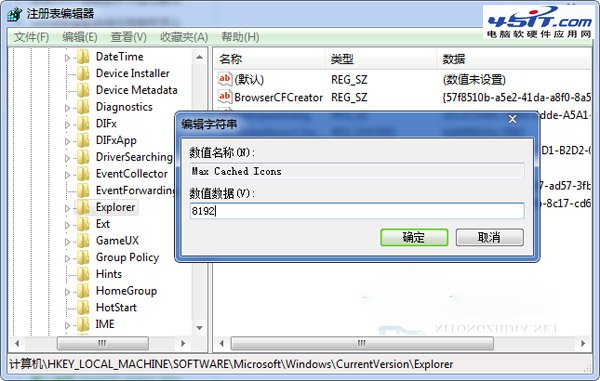
桌面圖示過多(>500)導致圖示快取溢位、重複讀取磁碟。註冊表 HKEY_LOCAL_MACHINE\SOFTWARE\Microsoft\Windows\CurrentVersion\Explorer\Max Cached Icons(字串值)預設 500,改為 8192 可大幅減少 I/O。
regedit;HKEY_LOCAL_MACHINE\SOFTWARE\Microsoft\Windows\CurrentVersion\Explorer;Max Cached Icons(字串值) → 數值資料 8192;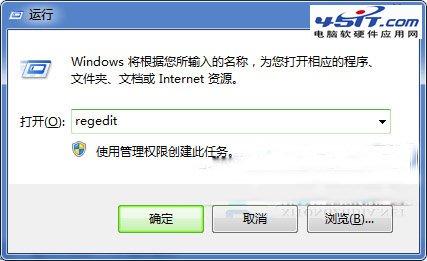
XP 無法存取 Win7 共享資料夾?關防火牆、改入站出站規則、開 Guest 帳號、設權限,99% 搞定
Windows 7 漫畫專輯:保護遊戲帳號(四):下載、隱私、心理與防釣魚四大關卡
Win7 登錄檔調校 Aero Peek 延遲:縮短「顯示桌面」反應時間,追求極致跟手感
Win7 輸入法管理全攻略:新增、刪除、調整優先順序、設定預設
Windows 7 內建 ISO 燒錄功能初體驗:右鍵一鍵燒錄,僅支援 ISO 格式
Windows 7 單一分區就夠了?大容量硬碟分區策略新思維