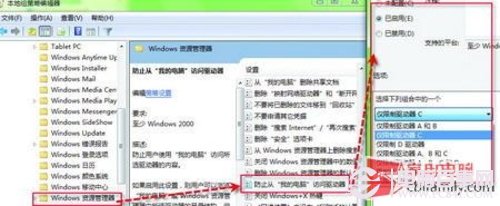
家有好奇寶寶或共用電腦,隱藏 C 盤可防止誤刪系統檔。透過群組原則(專業版以上)一鍵設定。
gpedit.msc
設定後「執行」輸入 C: 也無法進入;需解除限制時將原則設為「未設定」或「已停用」。Home 版無 gpedit.msc,可改用註冊表 NoDrives 值達成同樣效果。
C:
NoDrives
Windows 7 漫畫專輯:高效任務列善用技巧
Windows 7 安裝失敗常見四大原因與排除對策
Win7/Win8 啟用 Telnet 用戶端:控制台面板開啟 Windows 功能
關閉 Win7 開機動畫:msconfig「無 GUI 開機」一勾,跳過 Logo 直進登入,省秒數也省心力
Win7 雙擊捷徑彈出「我們無法驗證建立此檔案的發布者」?勾選「以管理員身分執行」一鍵解決
Win7 進入桌面黑屏無圖示?修改登錄 Shell 值大小寫即可修復
Windows 7 仍存檔案副檔名隱藏風險:惡意程式易偽裝
解決 Daemon Tools Lite 在 Windows 7 提示「無法載入適配器」