Windows XP Windows 7 Windows 2003 Windows Vista Windows 綜合教學 Linux 系統教學
Windows 10 Windows 8 Windows 2008 Windows NT Windows Server 電腦軟體教學

Win7 如何用 CMD 批量修改檔案屬性?attrib 指令快速移除唯讀屬性

編輯:Win7 系統基礎知識

大量檔案需移除唯讀屬性?Win7 內建 attrib 指令配合萬用字元,單行指令即可批量處理整個資料夾下所有檔案,無需第三方工具。本文示範以管理員身分執行 CMD 批量修改屬性。
操作步驟

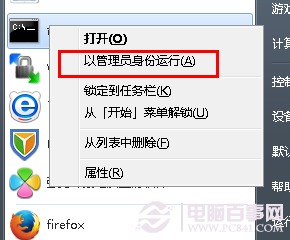
  1. 「開始」→「所有程式」→「附屬應用程式」→ 「命令提示字元」按右鍵 → 「以系統管理員身分執行」。
  2. 管理員 CMD
  3. 輸入指令:
    attrib -r D:\books\*.*
    說明:-r 移除唯讀屬性(+r 為新增),D:\books 為目標路徑,*.* 代表所有檔案。按 Enter 執行。

  4. attrib 指令執行

常用屬性參數:
+r / -r:唯讀
+h / -h:隱藏
+s / -s:系統檔案
+a / -a:封存
可組合使用,如 attrib -r -h -s D:\data\*.* 一次移除三種屬性。

Copyright © Windows教程網 All Rights Reserved