跳躍清單四大區塊解析(以IE為例)
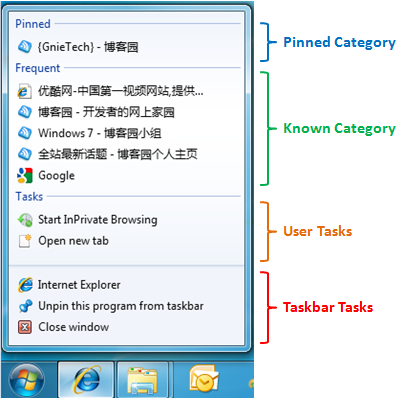
- Taskbar Tasks:所有程式固有(開啟程式、取消釘選、關閉視窗)。
- User Tasks:開發者自訂功能連結(如IE新分頁)。
- Known Category:系統預設類別 — Recent(最近)、Frequent(常用)、Neither(無)。Frequent記錄常用網頁,隨時間動態變化。
- Pinned Category:使用者右鍵「釘選」固定的項目,永久保留。
程式碼實作(C# / Windows API Code Pack)
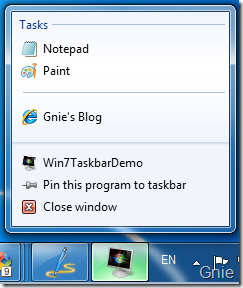
1. 建立 User Tasks
JumpList jumpList = JumpList.CreateJumpList();
string sysPath = Environment.GetFolderPath(Environment.SpecialFolder.System);

IJumpListTask notepadTask = new JumpListLink(Path.Combine(sysPath, "notepad.exe"), "Notepad")
{ IconReference = new IconReference(Path.Combine(sysPath, "notepad.exe"), 0) };

IJumpListTask paintTask = new JumpListLink(Path.Combine(sysPath, "mspaint.exe"), "Paint")
{ IconReference = new IconReference(Path.Combine(sysPath, "mspaint.exe"), 0) };

IJumpListTask separator = new JumpListSeparator();

IJumpListTask blogTask = new JumpListLink("https://gnielee.cnblogs.com", "GnIE's Blog")
{ IconReference = new IconReference(@"C:\Program Files\Internet Explorer\iexplore.exe", 0) };

jumpList.AddUserTasks(notepadTask, paintTask, separator, blogTask);
jumpList.Refresh();
2. 啟用 Known Category(需先註冊檔案關聯)
if (!TaskbarManager.Instance.ApplicationId.IsApplicationRegistered())
{
    TaskbarManager.Instance.RegisterFileAssociations(
        TaskbarManager.Instance.ApplicationId, false,
        TaskbarManager.Instance.ApplicationId,
        Assembly.GetExecutingAssembly().Location,
        ".jpg", ".png", ".gif", ".JPG", ".PNG", ".GIF");
}

jumpList.KnownCategoryToDisplay = JumpListKnownCategoryType.Recent;
// 或 Frequent, Neither
jumpList.KnownCategoryOrdinalPosition = 1; // 調整在JL中位置
jumpList.Refresh();
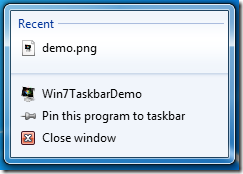
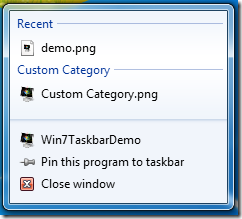
3. 建立 Custom Category
JumpListCustomCategory customCat = new JumpListCustomCategory("My Images");
JumpListLink item = new JumpListLink(Assembly.GetExecutingAssembly().Location, "demo.png")
{ IconReference = new IconReference(Assembly.GetEntryAssembly().Location, 0) };
customCat.AddJumpListItems(item);
jumpList.AddCustomCategories(customCat);
jumpList.Refresh();
關鍵提醒
- 必須呼叫
Refresh() 變更才生效。
IconReference 需在專案屬性設定圖示資源。- 完整程式碼請參考 Windows API Code Pack 範例專案。