Windows XP Windows 7 Windows 2003 Windows Vista Windows 綜合教學 Linux 系統教學
Windows 10 Windows 8 Windows 2008 Windows NT Windows Server 電腦軟體教學

Windows 7/Vista 關機時取消「安裝更新並關機」提示:群組原則一鍵屏蔽,更新檔保留下次手動裝

編輯:Win7 系統基礎知識

下載更新後想趕緊關機卻被強制安裝?Win 7/Vista 透過群組原則可屏蔽關機時的「安裝更新並關機」提示,更新檔案保留在系統目錄,下次方便手動安裝。

設定步驟

  1. Win+R → gpedit.msc 開啟群組原則編輯器
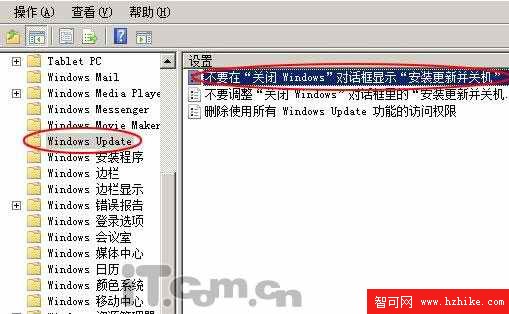
  2. 展開:使用者設定 → 系統管理範本 → Windows Update
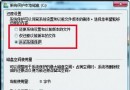
  3. 雙擊 「不要在『關閉 Windows』對話方塊顯示『安裝更新並關機』」
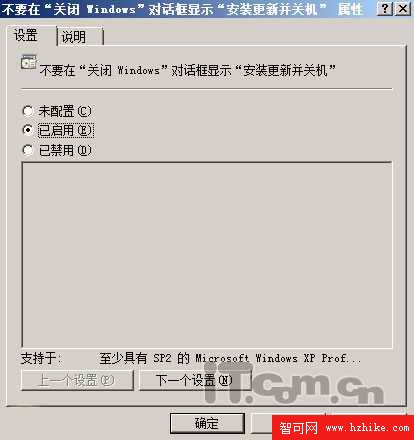
  4. 選 「已啟用」 → 確定

群組原則路徑

啟用設定

效果說明

  • 關機選單只剩「關機」,不再出現「安裝更新並關機」
  • 已下載更新檔保留在 C:\Windows\SoftwareDistribution,不會遺失
  • 下次開機或手動執行 Windows Update 時可繼續安裝

家庭版無 gpedit.msc 可對應修改登錄檔:HKCU\Software\Policies\Microsoft\Windows\WindowsUpdate\AU\NoAutoUpdate = 1(需建立鍵值)。

Copyright © Windows教程網 All Rights Reserved