Windows XP Windows 7 Windows 2003 Windows Vista Windows 綜合教學 Linux 系統教學
Windows 10 Windows 8 Windows 2008 Windows NT Windows Server 電腦軟體教學

舊版 MSE 導致 Windows 7 SP1 安裝失敗?升級防毒軟體即可解決

編輯:Win7 系統基礎知識

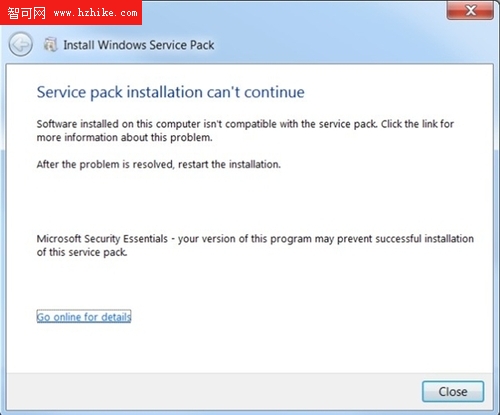
安裝 Windows 7 SP1 服務包時,若系統偵測到舊版 Microsoft Security Essentials (MSE) 或其他微軟安全產品(如 Forefront Client Security、Forefront Endpoint Protection),會攔截安裝並跳出錯誤:「MSE——你的版本會阻止 SP 的成功安裝」。

根本原因:mpfilter.sys 版本過舊

這些安全軟體安裝時會載入 mpfilter.sys 驅動程式。SP1 安裝程式會檢查該檔案版本,若低於 2.1.6804.0(對應 MSE 1.0.1963.0 以下版本),即判定不相容而終止安裝。
解決方案:先更新 MSE 再裝 SP1

  1. 開啟 MSE 主介面,點選「更新」分頁,手動檢查並安裝最新病毒定義與程式更新。
  2. 或直接前往 微軟官方下載頁 取得最新版 MSE 2.1 完整安裝包(支援 32/64 位元 XP、Vista、Win7)。
  3. 更新完成並重新啟動後,再執行 SP1 安裝即可順利通過相容性檢查。

同理,若安裝其他廠商防毒軟體也遇到類似阻擋,建議先更新至最新版或暫時解除安裝,完成 SP1 更新後再重裝防毒軟體。

Copyright © Windows教程網 All Rights Reserved