Windows XP Windows 7 Windows 2003 Windows Vista Windows 綜合教學 Linux 系統教學
Windows 10 Windows 8 Windows 2008 Windows NT Windows Server 電腦軟體教學

解決 Win7 無法建立程式庫錯誤 16389:群組原則「阻止使用者新增檔案到使用者資料夾」設為未啟用

編輯:Win7 系統基礎知識

右鍵「程式庫」→「新增」→「程式庫」彈出「錯誤 16389」,原因是群組原則限制寫入使用者設定檔根目錄。

修復步驟

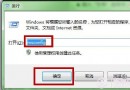
  1. Win + R → gpedit.msc → Enter(家用基本版無此工具,需升級或手動改登錄)。
  2. 依序展開:使用者設定 → 系統管理範本 → Windows 元件 → 檔案總管。
  3. 找到「防止使用者將檔案新增至對應使用者之使用者檔案夾根目錄」 → 雙擊。
  4. 選「未設定」或「已停用」 → 確定。
  5. 關閉編輯器 → 重開機 → 新增程式庫恢復正常。

原理

程式庫定義檔(.library-ms)預存於 %AppData%\Microsoft\Windows\Libraries,屬使用者設定檔根目錄下子資料夾。該原則啟用時禁止寫入根目錄,導致建立程式庫失敗。

家用基本版替代方案

Win + R → regedit → 定位 HKEY_CURRENT_USER\Software\Microsoft\Windows\CurrentVersion\Policies\Explorer → 新增/修改 DWORD NoFilesInUserProfileRoot = 0 → 重開機。


錯誤 16389 看似檔案系統損毀,實為群組原則誤傷。一鍵改原則/登錄即愈,程式庫功能重獲新生。

Copyright © Windows教程網 All Rights Reserved