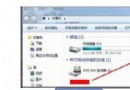
Windows 7 滑鼠右鍵「新增」選單中預設缺少「文字文件(記事本)」選項,導致無法快速建立純文字檔。
notepad)。Windows Registry Editor Version 5.00
[HKEY_CLASSES_ROOT\.txt]
@="txtfile"
"Content Type"="text/plain"
[HKEY_CLASSES_ROOT\.txt\ShellNew]
"NullFile"=""
[HKEY_CLASSES_ROOT\txtfile]
@="文字文件"
[HKEY_CLASSES_ROOT\txtfile\shell]
[HKEY_CLASSES_ROOT\txtfile\shell\open]
[HKEY_CLASSES_ROOT\txtfile\shell\open\command]
@="NOTEPAD.EXE %1"
notepad.reg(編碼選 ANSI 或 UTF-16 LE)。.txt 副檔名關聯至 txtfile。ShellNew 加入 NullFile 空值,告訴 Shell「新增」選單顯示此項目。txtfile\shell\open\command 為 NOTEPAD.EXE %1,雙擊 .txt 檔即以記事本開啟。Windows 7 / 8 / 10 / 11 均適用。若系統語言為繁體中文,@="文字文件" 即為正確顯示名稱。
Windows 7 「音訊服務未執行」三大解決方案:重啟服務、帳戶修正、音量拉滿
安裝 Office 2003 提示「系統管理員禁止安裝」解決辦法
Windows 7 旗艦版降級為家庭高級版:ImageX 手動覆蓋 Install.wim 實現版本回滾
Windows 7 系統備份大比拚:Ghost vs 內建映像備份,還原方式、遊戲存檔遷移、分區調整失敗救援全解析
金山裝機精靈 2.0 實測:邊看電影邊重灌 Win 7,1 分鐘備份 10GB 資料、20 分鐘完成全自動重灌
實測:單核心 CPU 能跑 Windows 7 嗎?效能與體驗完整報告