部分用戶從 Win 7 升級 Win 10 後,工作列搜尋列無法顯示結果。經查係升級過程中登錄項目遺留錯誤導致。刪除特定機碼並重開機即可修復。
regedit 開啟登錄編輯器。HKEY_LOCAL_MACHINE\SOFTWARE\Microsoft\Windows\CurrentVersion\Explorer\FolderTypes\{ef87b4cb-f2ce-4785-8658-4ca6c63e38c6}\TopViews\{00000000-0000-0000-0000-000000000000}
HKEY_LOCAL_MACHINE\SOFTWARE\Wow6432Node\Microsoft\Windows\CurrentVersion\Explorer\FolderTypes\{ef87b4cb-f2ce-4785-8658-4ca6c63e38c6}\TopViews\{00000000-0000-0000-0000-000000000000}

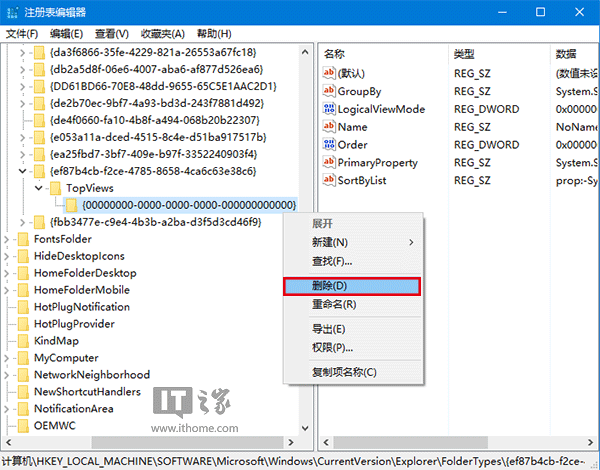
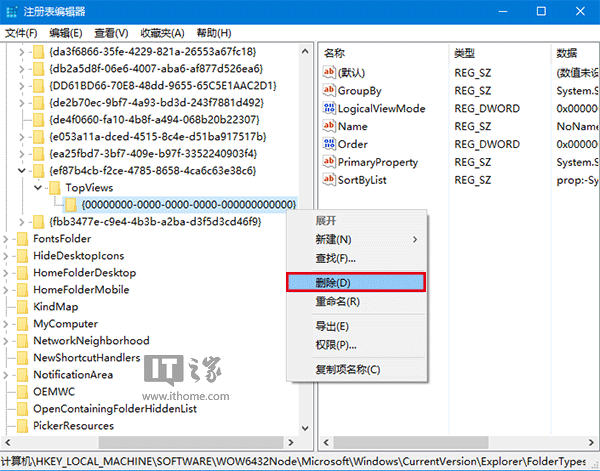
此為升級遺留註冊表垃圾導致,刪除後不影響其他功能。
Windows 7 系統安全防護全攻略:帳戶控制、自動更新、UAC 等級、自動播放、Windows Defender、防火牆、IE8 隱私與釣魚防護
Win7/Vista 磁碟機代號消失?資料夾選項勾選「顯示磁碟機代號」即可恢復
新購 Windows 7 筆電必做四步驟:正版驗證、系統還原點、MSE 安裝、補丁更新
Win 7 不需 Ghost 也能備份還原(三):映像還原優於 Ghost
Windows 7 功能亮點:遠端媒體串流,隨時隨地享受家中媒體庫
使用 Acronis Disk Director Suite 無損調整 Vista/Win 7 分區大小