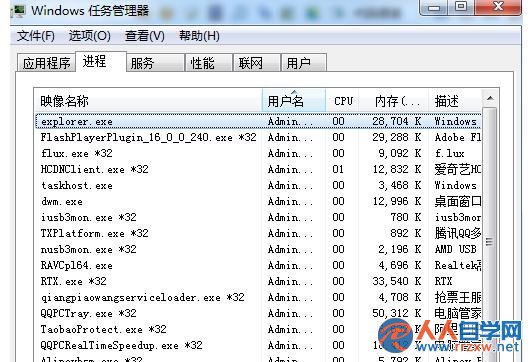
USB 隨身碟插入後電腦停止回應,實為 explorer.exe 進程掛起。透過工作管理員重啟該進程即可解決,不影響資料。
explorer.exe
Windows 核心進程 explorer.exe 因 USB 裝置掛載異常無回應。
此法與前文相同,屬重複內容。建議備份隨身碟資料並檢查硬體狀態。
Win7 极速查看檔案屬性:Alt + 雙擊,跳過右鍵選單
善用 Windows 7 稽核策略 完整掌握電腦程式執行紀錄
Windows 7 刪除 Wubi 安裝 Ubuntu 殘留開機選單項目
揭秘 Windows 7 研發內幕:從 Vista 挫折到「7」號計畫的修煉之路
Windows 7/XP 安裝 Linux 雙系統完整圖文教學:U 盤啟動、分割磁碟、UltraISO 製作
Windows 7 Ghost 系統安裝後出現 Administrator.xxx 重複使用者資料夾解決法
Win7 雙螢幕視窗最大化無法全螢幕?切換顯示模式秒修復
Win7 插入 USB 隨身碟假死怎麼辦?重啟 explorer.exe 進程快速恢復