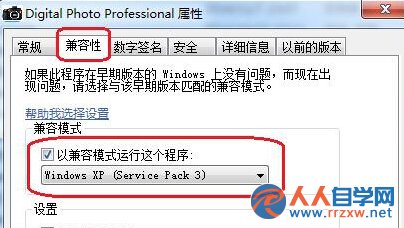
Canon Digital Photo Professional (DPP) 版本過舊,與 Win7 相容性不足,導致模組 DppViewerModule 崩潰彈窗。
DppViewerModule
DppViewer.exe
前往 Canon 官網下載最新版 DPP,新版已原生支援 Win7/10/11,可徹底解決相容性問題並獲得新功能。
Win7 服務優化禁區:10 個絕不能關閉的關鍵服務
Windows Update 找不到 Win 7 SP1?三大原因與解決方案完整攻略
Win7 開啟虛擬無線網卡,一鍵建立 Wi-Fi 熱點分享上網
Windows 7 加速五大招:停用啟動項、清理暫存檔、磁碟清理、移除舊程式、磁碟重組
Win7 64 位元滑鼠延遲、游標亂跳?硬體排查:斷線焊接、光電干擾、晶振老化
Win7 重設列印子系統徹底解決印表機怪問題:登錄與檔案雙清
Windows 7 架設 VPN 伺服器:讓遠端裝置安全接入區域網路
Win7 純淨版安裝 UE 軟體後關機藍屏 0x00000018?PsExec 修復登錄徹底解決