Windows XP Windows 7 Windows 2003 Windows Vista Windows 綜合教學 Linux 系統教學
Windows 10 Windows 8 Windows 2008 Windows NT Windows Server 電腦軟體教學

Win7 使用指令快速關閉網路共享 (net share) 完整教學

編輯:Win7 常見問題解答

適用情境

當需要批次移除磁碟機共享、IPC$ 共享,或透過腳本自動化管理共享資源時,使用 net share 指令比圖形介面更高效。

操作步驟

  1. 開啟命令提示字元
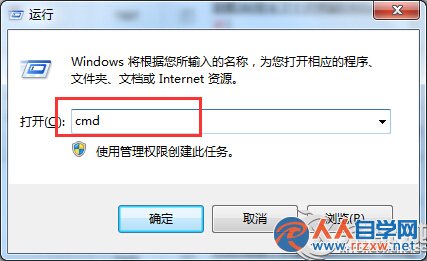
    按 Win + R 輸入 cmd,按 Enter。
    開啟 CMD
  2. 查詢目前共享清單
    輸入 net share 按 Enter,系統會列出所有共享資源(共享名、資源路徑、備註)。
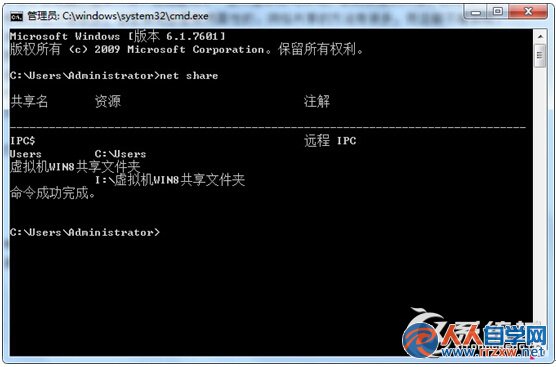
    net share 查詢結果
  3. 刪除特定共享
    根據需求輸入對應指令:
    • 刪除 C 槽共享:net share c$ /delete
    • 刪除 D 槽共享:net share d$ /delete
    • 刪除 IPC$ 共享:net share ipc$ /delete
    • 刪除自訂共享(如 myshare):net share myshare /delete

    執行後若顯示「共享資源已成功刪除」即代表成功。

補充說明

  • 管理員預設共享(C$、D$、IPC$、ADMIN$)刪除後,重新開機或重啟 Server 服務會自動重建。若需永久停用,請至「服務」中停用 Server 服務或修改註冊表 AutoShareServer / AutoShareWks。

  • 操作需系統管理員權限。
Copyright © Windows教程網 All Rights Reserved