.exe 執行檔關聯損壞(雙擊 .exe 無反應、以記事本開啟、彈出「開啟方式」),透過登錄恢復 exefile\shell\open\command 預設值即可修復。
exefile\shell\open\command
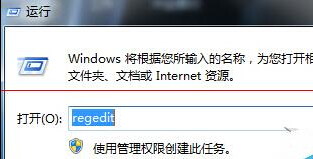
regedit
HKEY_CLASSES_ROOT\exefile\shell\open\command
"%1" %*
lnkfile
batfile
cmdfile
regfile
shell\open\command
HKEY_CLASSES_ROOT
修改 Windows 7 遠端桌面預設埠 3389 兩大法
Win7 使用 USB 隨身碟必知三大注意事項:正確拔除、減少刷新、避免長時間空轉
一鍵統一 Windows 7 所有資料夾檢視模式
徹底刪除 Win7 頑固 System Volume Information 資料夾
Win7 無法安裝 RNDIS 驅動?裝置管理員手動指定「遠端 NDIS 相容裝置」解決
如何刪除 Win 7 病毒資料夾 System Volume Information?關閉系統還原後取得權限刪除
Win7 快速解除安裝程式技巧:開始選單輸入「解除安裝」直達清單
Win7 關機緩慢?兩大常見成因與對策:背景程式未關、更新/驅動安裝中