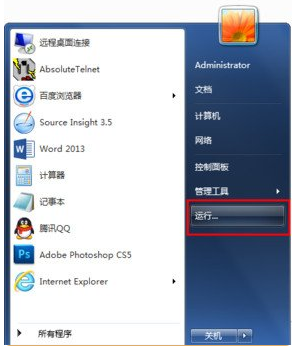
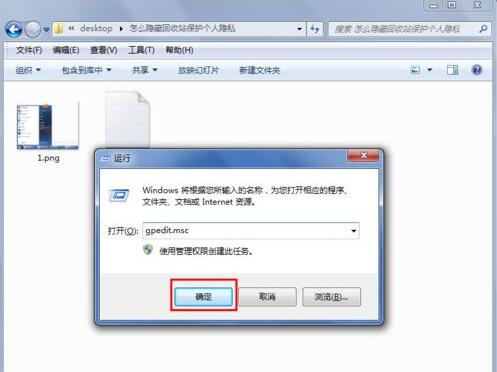
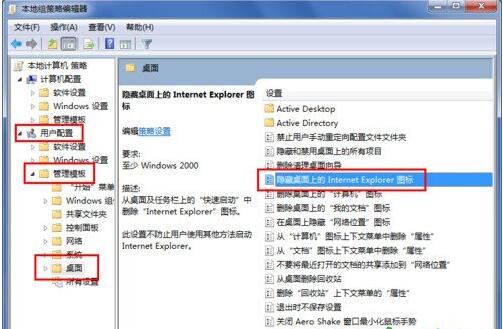
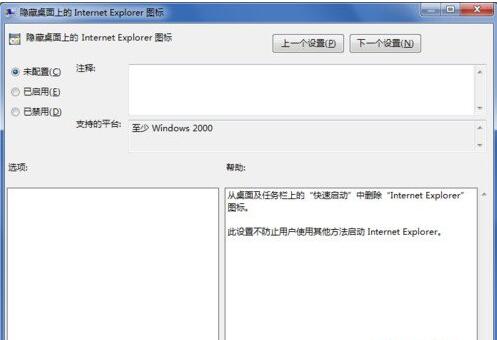
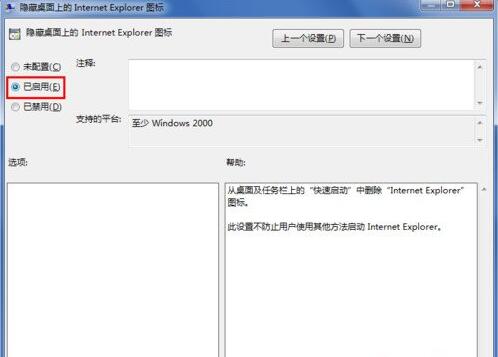
Win7 桌面的 IE 圖示無法直接刪除,需透過群組原則編輯器隱藏。此法適用於專業版、企業版、旗艦版。
gpedit.msc
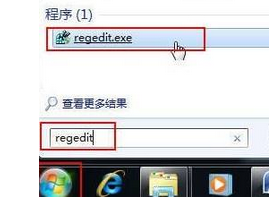
若為家用版無群組原則,可改用登錄檔修改 HKEY_LOCAL_MACHINE\SOFTWARE\Microsoft\Windows\CurrentVersion\Explorer\Desktop\NameSpace\{871C5380-42A0-1069-A2EA-08002B30309D} 相關值隱藏。
HKEY_LOCAL_MACHINE\SOFTWARE\Microsoft\Windows\CurrentVersion\Explorer\Desktop\NameSpace\{871C5380-42A0-1069-A2EA-08002B30309D}
三星筆電 Win7 藍畫面 0x0000000A 排除:事件檢視器定位驅動、停用新驅動、移除新硬體、BIOS/相容性檢查九步驟
電腦玩《守望先鋒》卡頓?品牌機縮水配置難升級,建議換新組裝機
Win7 查看 BIOS 中 SLIC 資訊:WMIC 指令一鍵讀取 OEM 廠商與授權表
Win7 Aero 玻璃透明效果開啟/關閉全攻略:個人化設定一步到位
Win7 Aero 玻璃特效無法開啟?內建疑難排解一鍵修復
Windows 7 查看與修改電腦名稱、網域與工作群組設定
Win7 開機錯誤 0xC000000F「啟動失敗」?Windows 7 安裝光碟重建 BCD 完整修復教學
Windows 7 取消開機自動啟動放大鏡:輕鬆存取中心關閉