解除安裝迅雷影音後仍持續彈出「影音資訊」廣告視窗,主因是殘留程式 KKTIP.EXE 仍在背景執行。需結束程序並刪除安裝目錄殘留檔案。

KKTIP.EXE 並結束程序,視窗即會關閉,確認為迅雷影音殘留元件。KKTIP,定位至 C:\Users\Public\Video Legend\RBC\Program,需刪除整個 Video Legend 資料夾。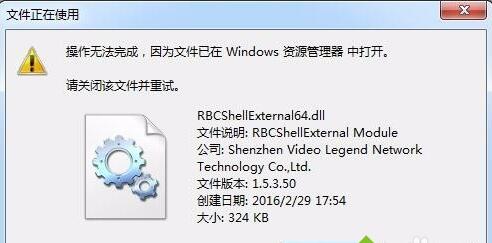
RBCShellExternal64.dll 正在被 explorer.exe 使用,需先結束 explorer.exe:C:\Users\Public\Video Legend\RBC\Addinsdel RBCShellExternal64.dll 先不按 Enterexplorer.exeexplorer.exe(檔案 → 執行新工作 → 輸入 explorer.exe)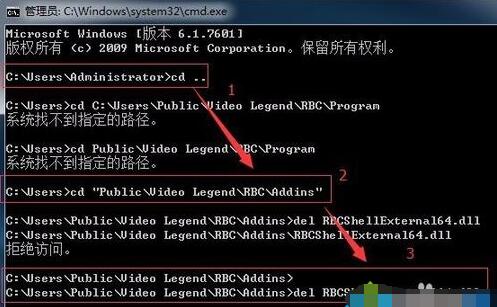
C:\Users\Public\Video Legend 整個資料夾,廣告視窗徹底消失。此法可徹底清除迅雷影音殘留廣告元件,避免重開機後再次彈出。