.exe 執行檔雙擊無反應、跳出「開啟方式」視窗或錯誤訊息,主因是檔案關聯被病毒/木馬竄改 (將 HKEY_CLASSES_ROOT\.exe 改為其他程式)。本文提供命令列修復與登錄匯入兩種完整解法。
cmd.exe。cmd.exe → 「重新命名」 → 改為 cmd (去除 .exe 副檔名) → Enter。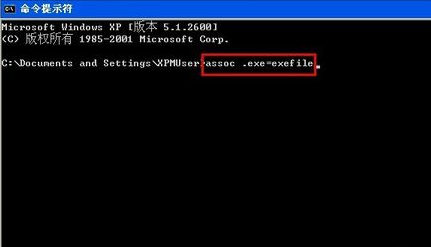
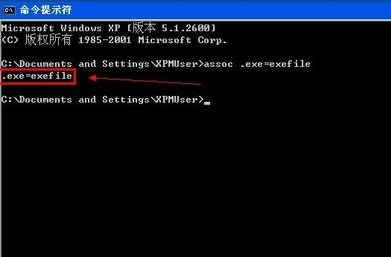
assoc .exe=exefileftype exefile="%1" %*.exe=exefile 即代表修復成功。Windows Registry Editor Version 5.00
[HKEY_CLASSES_ROOT\.exe]
@="exefile"
"Content Type"="application/x-msdownload"
[HKEY_CLASSES_ROOT\.exe\PersistentHandler]
@="{098f2470-bae0-11cd-b579-08002b30bfeb}"
[HKEY_CLASSES_ROOT\exefile\shell\open\command]
@="\"%1\" %*"
修復exe關聯.reg → 儲存類型「所有檔案」 → 桌面存檔。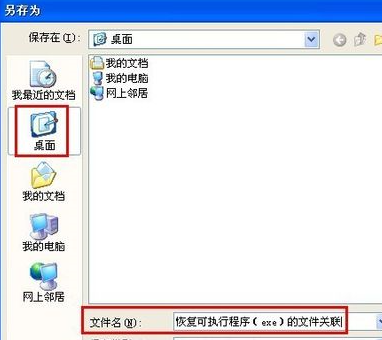
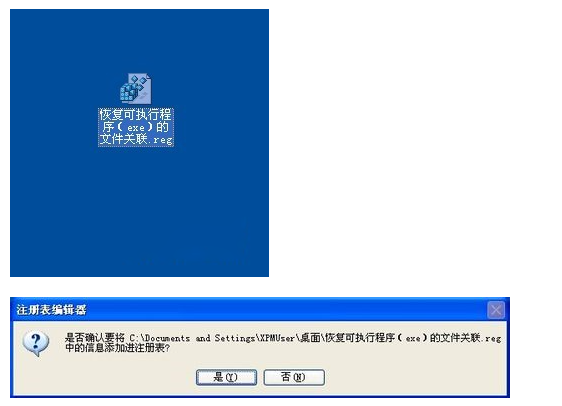
explorer.exe 生效。HKEY_CLASSES_ROOT\exefile\shell\open\command 預設值是否為 "%1" %*,若有額外參數 (如 malware.exe "%1" %*) 刪除多餘部分。