使用 mysqldump 工具可快速匯出單表資料至文字檔,適合備份、遷移、分析。
Path 包含 MySQL bin 目錄(如 C:\Program Files\MySQL\MySQL Server 5.7\bin),否則需完整路徑執行。# 基本語法
mysqldump -h [主機] -u [使用者] -p [資料庫] [資料表] > [輸出檔路徑]
# 實際範例:匯出 tomtopportal 資料庫的 t_article_base 表到 E 盤
mysqldump -h localhost -u root -p tomtopportal t_article_base > E:\xitongcheng.com.txt
cmd → 以系統管理員身分執行。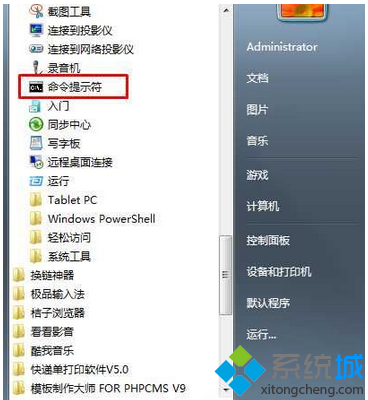
Enter password: 輸入 MySQL root 密碼(輸入過程不顯示字元),按 Enter。E:\xitongcheng.com.txt 驗證。| 參數 | 用途 |
|---|---|
--single-transaction | InnoDB 熱備份不鎖表 |
--where="id > 1000" | 條件篩選匯出 |
--no-data | 僅匯出結構 |
-B db1 db2 | 匯出多個資料庫 |