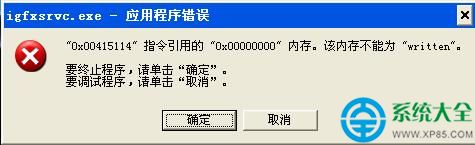
igfxsrvc.exe 為 Intel 顯示卡驅動相關服務進程 (Intel Common User Interface Service Module),負責熱鍵切換顯示模式、螢幕旋轉、多螢幕管理等。開機報錯通常源於:
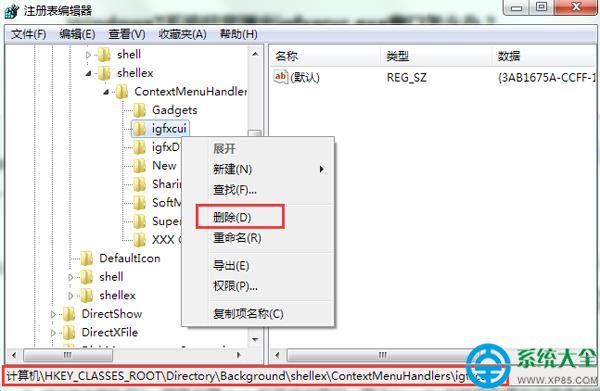
igfxcui 註冊表鍵值損壞/殘留regedit → EnterHKEY_CLASSES_ROOT\Directory\Background\shellex\ContextMenuHandlers\igfxcui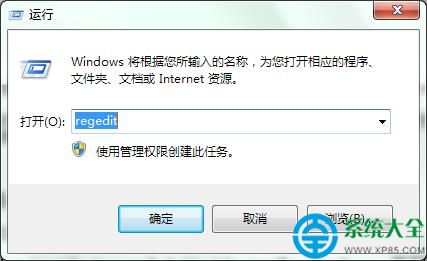
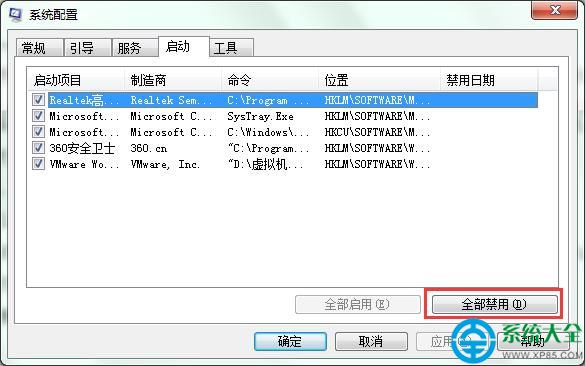
msconfig → Enter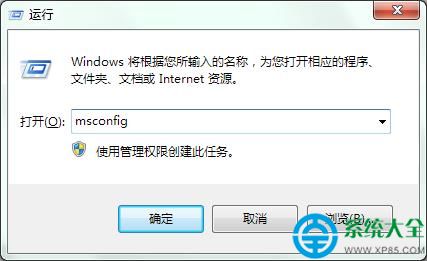
| 檢查項目 | 工具/指令 | 正常標準 |
|---|---|---|
| igfxsrvc.exe 數位簽章 | 工作管理員 → 詳細資料 → 右鍵內容 → 數位簽章 | 簽章者:Intel Corporation / 受信任 |
| 檔案路徑 | 同上 → 開啟檔案位置 | C:\Windows\System32\igfxsrvc.exe |
| 病毒掃描 | Windows Defender / 第三方殺毒全盤掃描 | 無威脅偵測 |
| 事件檢視器 | eventvwr.msc → Windows 記錄 → 應用程式/系統 | 無 igfxsrvc 相關 Error/Warning |
「刪除 igfxcui 註冊表項」+「禁用啟動項排查」+「更新 Intel 顯示卡驅動」三步走,可徹底根治 Win7 開機 igfxsrvc.exe 應用程式錯誤。