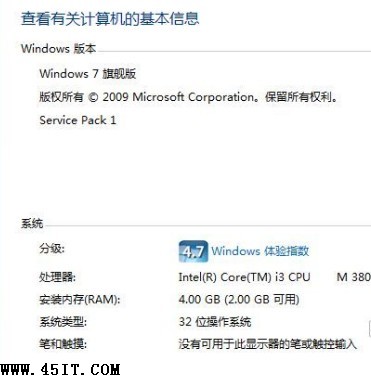
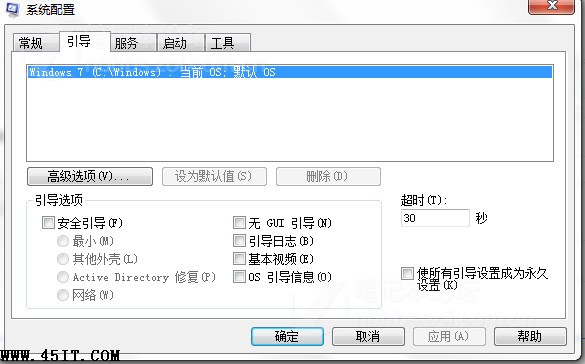
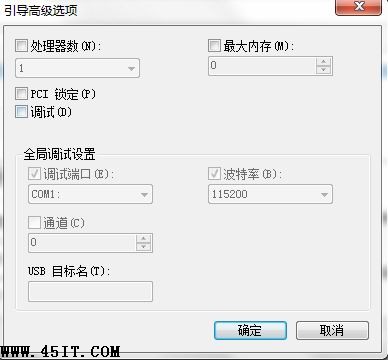
32 位元 Win7 理論可用 3.25GB,若顯示「安裝記憶體 4.00GB (2.00GB 可用)」,主因是 msconfig 啟用「最大記憶體」限制 (可能被優化工具誤設)。
msconfig
3328
根治: 32 位元系統硬體限制約 3.25~3.5GB 可用,需完整使用 4GB+ 請改裝 64 位元 Windows 7 (理論支援 3.8GB+)。
Win7 Xshell 亂碼解決法?同 92207,終端機編碼改 UTF-8
Win7 調制解調器錯誤 (錯誤 651/678/691) 完整排查:檢查線路、重建連線、替換 raspppoe.sys
Windows 7 桌面出現無法關閉的白色方框?重新啟動 Explorer 修復
Win7 設定桌面背景自動輪換:打造個性化動態桌面
Win7 無法結束 bcservice.exe 進程?服務停用與檔案刪除徹底清除百度雲殘留
Win7 下載軟體提示「未知發行者」?調整 IE 安全性設定允許執行未簽名程式碼
Win7 任務列音量圖示不見了?一鍵找回系統圖示設定教學
Windows 7 關閉視窗自動最大化 (Aero Snap) 功能