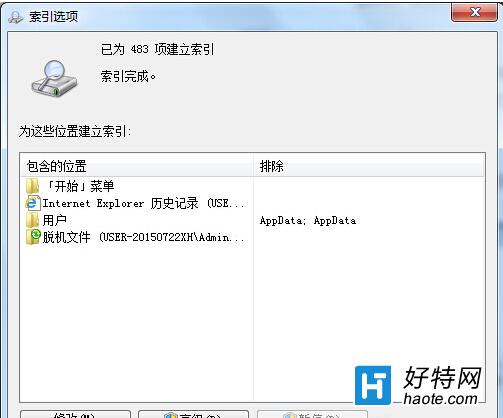
Windows 搜尋索引雖能加快檔案搜尋,但過多索引會佔用資源。可透過「索引選項」移除不需索引的路徑。
完成後系統將重建索引,移除的路徑不再納入搜尋範圍,可減少背景索引負擔。
Win7 使用 360 瀏覽器登入信箱完整操作教學
Windows 7 筆電合上蓋子動作自訂:睡眠、休眠、關機、無動作四選一,含睡眠/休眠差異解析
Win7 IE 瀏覽器網頁自動關閉/閃退?四大錯誤類型與對應修復方案
Windows 7 服務優化:十大絕不能關閉的核心服務與安全關閉清單
Windows 7 顯示卡硬體加速開啟教學:四步驟調整疑難排解滑桿提升遊戲效能
從 XP 升級 Win 7 開機變慢?核心原因與加速方案
手機連 Win7 不斷跳出「正在安裝驅動程式」?隱藏空磁碟機解決
Windows 7 系統修復光碟製作完整教學:內容解析與燒錄步驟