Windows XP Windows 7 Windows 2003 Windows Vista Windows 綜合教學 Linux 系統教學
Windows 10 Windows 8 Windows 2008 Windows NT Windows Server 電腦軟體教學

Win7 快速啟動列消失?一鍵恢復經典快速啟動欄

編輯:Win7 系統應用技巧

Win7 任務列左側原有的「快速啟動」區域預設隱藏,實際上對應 %AppData%\Microsoft\Internet Explorer\Quick Launch 資料夾。透過「新增工具列」指向此路徑即可恢復經典快速啟動體驗。

恢復步驟

步驟 1:新增工具列指向 Quick Launch 資料夾

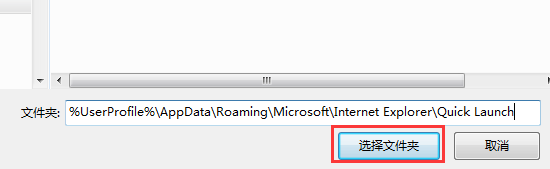
任務列空白處右鍵 → 「工具列」→ 「新增工具列」→ 在資料夾路徑輸入:

%UserProfile%\AppData\Roaming\Microsoft\Internet Explorer\Quick Launch

點擊「選擇資料夾」。

新增工具列路徑輸入

步驟 2:調整顯示位置

工具列出現在任務列右側,解除鎖定任務列(右鍵取消勾選「鎖定任務列」),拖動工具列標題左側的虛線把手移至開始按鈕右側,再鎖定任務列。

使用技巧

  • 將常用程式捷徑拖入此區域即可快速啟動。
  • 右鍵工具列標題可取消「顯示文字」「顯示標題」以節省空間。
  • 若資料夾不存在,可手動建立同名路徑。
Copyright © Windows教程網 All Rights Reserved