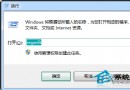
電腦管理 (compmgmt.msc) 整合工作排程器、事件檢視器、共用資料夾、本機使用者與群組、效能監視器、裝置管理員、磁碟管理、服務等核心管理單元。三種開啟方式:
compmgmt.msc
若找不到 compmgmt.msc (路徑 C:\Windows\System32\compmgmt.msc),可能系統檔案損毀,可用 sfc /scannow 修復或從同版本系統複製補回。
C:\Windows\System32\compmgmt.msc
sfc /scannow
Win7 和 Win8 哪個好?深度對比幫你做選擇
華碩筆記本網絡圖標顯示紅叉?網卡禁用/驅動缺失/網線故障三步排查
Win7 喇叭/耳機無聲音?揚聲器設定四聲道修復教學
Win7 如何查看 QQ 好友 IP 位址?使用資源監視器追蹤網路連線
硬碟安裝 Win7 還原 C 槽提示 10100 錯誤?兩招解決檔名與路徑問題
Win7 安裝受阻無法存放在 C 盤?兩招快速解決磁碟格式問題
Windows 7 基礎教學課程 5:中文輸入法完整教學(搜狗拼音安裝、切換、輸入、儲存檔案)
Windows 7 SP1 RC 熱門問答彙整:安裝需求、升級限制、到期時間